
Go to documentation repository


Page History
To work with the ZKTeco PUSH SDK integration module, you must install and configure the AxACFA feature. For more details, see Connecting and configuring the AxACFA feature.
To configure the ZKTeco PUSH SDK parent object, do the following:
- Create the ZKTeco PUSH SDK parent object on the basis of the Axacfa object on the Hardware tab of the System settings window.

- Specify the port number to connect to the ZKTeco SDK, by default—8088.
- Click the Apply
 button to save the settings.
 - Wait for the registration request event from the required ZKTeco device to appear in the Event viewer, since in this integration, the ZKTeco devices connect to ACFA PSIM.
Example of a registration request event from a ZKTeco device in the Event viewer: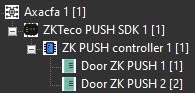
- After the registration request event appeared in the Event viewer, click Click the Download configuration
 button to download the configuration and build the hardware tree.
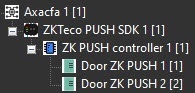
A hardware tree will be built:
- Click the Upload configuration
 button to upload the configuration into all ZKTeco PUSH SDK devices.
 - Click the Upload access parameters
 button to upload user access parameters from the Access Manager into all ZKTeco PUSH SDK devices.
Configuration of the ZKTeco PUSH SDK parent object is complete.
Overview
Content Tools