
Go to documentation repository


Page History
All created presets are displayed in the corresponding list. To switch a PTZ camera to a preset, you can use the presets list. To do this, left-click the corresponding line in the given presets preset list.

To switch to a PTZ camera to a preset, you can also use the Enter the Enter number panel. To display the Enter the Enter number panel, click the Enter number button.
...
To switch to a preset using the Enter the Enter number panel, you must perform do the following steps:
- Using the numeric digital buttons (0-9), enter the number of the preset to which you want to switch.
The entered number is displayed in a special field.
To delete the last digit entered, click the button.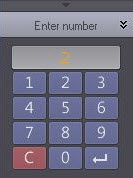
- Click the
 button to switch to the preset with the number entered. The camera will then be switched switches to the desired required position.
Switching to a preset using the Enter number panel is now complete.
| Info | ||
|---|---|---|
| ||
Examples of entering a number: 5, 0, 5, 5, 7, |
...
Overview
Content Tools