
Go to documentation repository


Page History
카메라 상태에 대한 정보는 보드 왼쪽 상단 모서리에 있는 버튼을 통해 선택할 수 있는 세 가지 방법으로 표시할 수 있습니다.
- 다이어그램

- 텍스트가 있는 다이어그램
- 테이
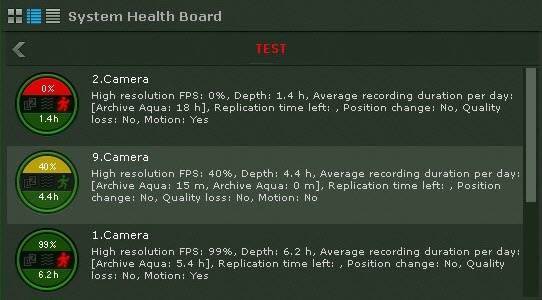
Information about the status of cameras can be displayed in three ways, chosen via the buttons in the upper-left corner of the board:
- As diagrams.
- As diagrams with text.
- As a table.

| Info | ||
|---|---|---|
| ||
Disconnected cameras are displayed at the end of the list with dimmed brightness. |
Tables can be sorted by any column in any direction.
The following information is displayed for each camera:
연결이 끊긴 카메라는 목록 끝에 희미한 밝기로 표시됩니다. |
표는 어느 열, 어느 방향으로든 정렬할 수 있습니다.
각 카메라에 대해 다음 정보가 표시됩니다.
카메라의 고화질 스트림 fps 설정에 대한 실제 비디오 fps의 백분율입니다 (카메라 객체 참고).
- 검출 도구의 상태 (품질 손실, 위치 변경, 동작)
- 심도(Depth)란 아카이브에 저장된 가장 오래된 비디오의 시작부터 가장 최근 비디오의 끝까지의 시간 또는 일 수를 말합니다(카메라에 아카이브 녹화가 구성되지 않은 경우 이 섹션은 다이어그램에서 회색으로 표시됩니다).
하루 평균 녹화 시간은 총 녹화 시간을 보관/보관 시간(가장 먼저 저장된 비디오부터 현재까지의 시간)으로 나눈 비율입니다
The percentage rate of actual video fps to the camera's high definition stream fps setting (see The Camera object).
- Status of detection tools (loss of quality, position change, motion).
- Depth refers to the number of hours or days from the start of the earliest video stored in any archive to the end of the most recent video (if archive recording is not configured for the camera, this section is colored gray on the diagram).
Average recording time, in hours per day, is the ratio of the total recording time to the age of the archive/retention time (time from the earliest stored video to now).
Info title Note For constant recording, this parameter value is equal to 24 hours. If the recording takes 50 percent of total time, the value is 12 hours.
- Remaining time for replication of the archive.
The camera status is measured based on the signal from the camera and stream rate:
- Normal – camera signal present, frame rate is from 70% to 100%. The camera is colored green on the diagram and in the table.
- Borderline – camera signal present, frame rate is from 20% to 70%. The camera is colored yellow on the diagram and in the table.
- Critical – no camera signal or frame rate is less than 20%. The camera is colored red on the diagram and in the table.
Information is updated every ten seconds.
If there is no signal from a camera, the appearance of the diagram changes accordingly.

Information about detection tools is received in real time. Depending on the status of detection tools, the corresponding icons change color:
지속적인 기록의 경우 이 매개변수 값은 24시간과 같습니다. 기록이 총 시간의 50%를 차지하는 경우 값은 12시간입니다.
- 아카이브의 복제까지 남은 시간
카메라 상태는 카메라의 신호와 스트림 속도를 기준으로 측정됩니다.
- 정상 - 카메라 신호가 있고 프레임 속도는 70%에서 100%입니다. 카메라는 다이어그램과 표에서 녹색으로 표시됩니다.
- 경계선 - 카메라 신호가 있고 프레임 속도가 20%에서 70%입니다. 카메라는 다이어그램과 표에서 노란색으로 표시됩니다.
- 심각 – 카메라 신호가 없거나 프레임 속도가 20% 미만입니다. 카메라는 다이어그램과 표에서 빨간색으로 표시됩니다.
정보는 10초마다 업데이트됩니다.
카메라에서 신호가 없으면 다이어그램의 모양도 그에 따라 바뀝니다.
검출 도구에 대한 정보는 실시간으로 수신됩니다. 탐지 도구의 상태에 따라 해당 아이콘의 색상이 변경됩니다.
- 녹색 – 검출 도구 상태 정상
- 빨간색 – 검출 도구 활성화됨
- 회색 – 검출 도구 비활성화됨
- green – detection tool status is normal,
- red – detection tool activated,
- gray – detection tool disabled.
Overview
Content Tools