
Go to documentation repository


Page History
...
The Fit screen function allows displaying a viewing tile Surveillance window by default so that it occupies all of the available space on the screen (full screen). The default zoom level step for full screen display is calculated automatically as a minimum zoom value thal that allows filling the available screen space with the viewing tile contentsSurveillance windows.
To enable the Fit screen function for a specific video tileSurveillance window, display the digital zoom controller (see see Digital video zoom), click the  button on it, and save changes when exiting editing mode.
...
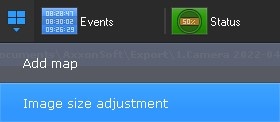
To enable the Fit screen function for all video tiles Surveillance windows on the layout, open the context menu and select select Image size adjustment.
| Info | ||
|---|---|---|
| ||
To disable Fit screen across all layouts reselect , reselect Image size adjustment. |
Now when a user switches to this layout, the video in the viewing tile Surveillance window is displayed at the calculated minimum necessary level step of digital zoom and the viewing tile Surveillance window occupies all available space.
...
Overview
Content Tools