
Go to documentation repository


Page History
...
- Information on the installed version of Axxon One and active license (1).
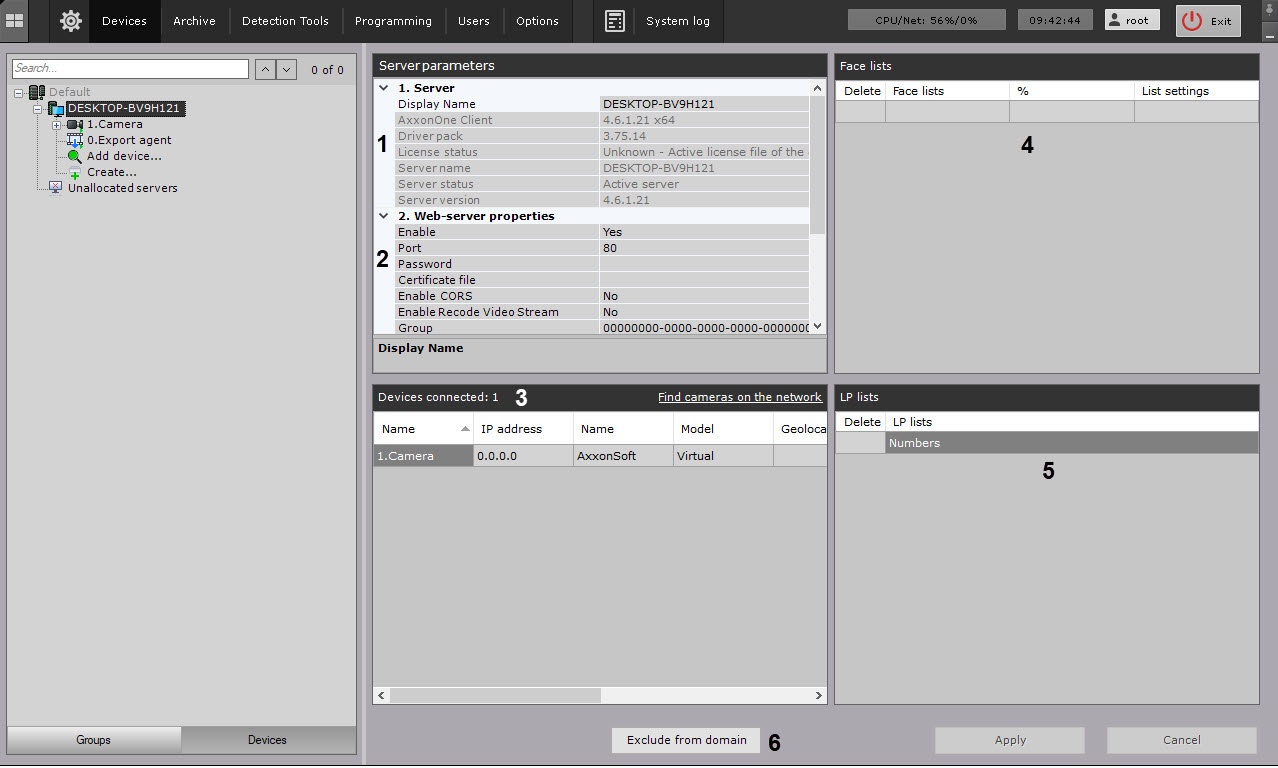
- Web-Server configuration options (2, see Configuring the Web-Server).
A list of video cameras connected to the Server, with the main parameters (3). Cameras are listed in a table with the following columns: Name, IP address, Name, Model, Geolocation, Azimuth, Video Stream, Frame Rate and Resolution. You can sort the table by columns.
Info title Note If no cameras have been created on a Server, you are prompted to search for IP devices on the network (the IP Device Discovery Wizard is launched, see Searching, adding, configuring, and removing IP devices).
Info title Note The number of connected devices means the total number of available IP video channels, including disabled.
- Created lists of facial templates (4, see Configuring face recognition based on the created lists Checking in lists of faces).
- Created ANPR lists (5, see Configuring vehicle license plate recognition based on the created lists Checking in lists of LPs)
The button to remove Server from an Axxon-domain (6, see Removing a Server from an Axxon-domain).
Overview
Content Tools