
Go to documentation repository


Page History
...
The client connects to different domains automatically when you start it (see Automatic connection). First, it connects to the main domain. The client connects to other domains in the background after you start it. You can also connect to multiple domains manually in the Client authorization window (see Starting the client). To do this, specify several servers separated by commas in the format: <Server1 name or IP address>:<Connection port>, <Server2 name or IP address>:<Connection port>, and so on. The server listed first will be the main server (see Automatic connection).

To connect the client to multiple domains, the following conditions must be met:
- each server to which the client connects has the Axxon One Enterprise or Axxon One Unified license activated (see Types of licenses). For example, some servers can have the Axxon One Enterprise license activated, while others can have the Axxon One Unified license activated;
- Server name and IP addresses must not be the same;
- connection to all servers is made using a single Username and Password pair that must be created in each domain;.
When the client connects simultaneously to multiple servers from different domains, the system settings section is duplicated for each domain (see Server settings).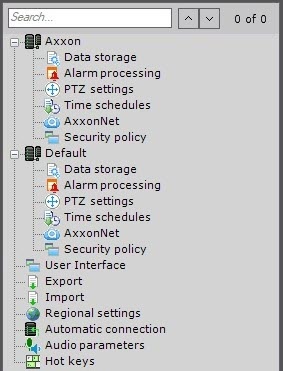
Overview
Content Tools