
Go to documentation repository


Page History
동일한 모델과 펌웨어를 가진 카메라들을 일괄 설정할 수 있습니다. 다음 절차를 따르십시오.
- 카메라 하나를 설정합니다.
 버튼을 클릭하고 동일한 설정을 적용할 카메라들을 선택합니다.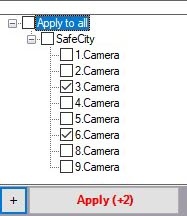
동일한 모델과 펌웨어를 가진 카메라 목록이 열립니다. 여러 카메라를 빠르게 선택하려면 Shift 키를 누른 채 첫 번째 및 마지막 카메라를 선택하십시오. 선택한 카메라 중 하나를 클릭하면 모두 선택됩니다.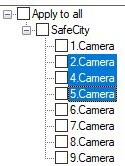
- Apply 버튼을 클릭합니다
You may bulk configure cameras of the same model and firmware. Do the following:
- Configure any camera.
- Click the button and select cameras the same settings should be applied to.
A list of cameras of the same model and firmware opens. To quickly select multiple cameras, hold down the Shift key, select the first and last cameras the settings should be applied to. Selecting any camera from highlighted ones will result in selecting them all. - Click the Apply button.
| Info | ||
|---|---|---|
| ||
The number in brackets refers to the number of configured cameras대괄호 안의 숫자는 설정된 카메라의 수를 나타냅니다. |
Overview
Content Tools