
Go to documentation repository


Page History
...
- Go to the Devices tab.
- Select the Microphone object in the object tree. If necessary, you can change the values of the parameters that are listed in the table:
Parameter Value Description Other Enable Yes By default, the microphone is disabled. To enable it, select Yes No Name Microphone If necessary, enter the microphone name Audio codec RAW Select the codec used to compress the audio stream Volume High level Select the volume level of the audio device Low level Camera Camera 1.Camera From the drop-down list, select the camera with which you want to bind the microphone. As a result, the microphone becomes a child of the selected camera - Click the Apply
 button.
To check the operation of the microphone, do the following:
- Go to the layout with the required camera and activated microphone
- In the upper left corner of the preview window, left-click the speaker icon
 .
. - Send an audio signal to the microphone.

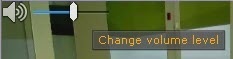
- If the microphone is configured correctly, the audio signal is transmitted to the server speakers. To change the volume level, use the slider.
...
Overview
Content Tools