
Go to documentation repository


Page History
The Voice notification service object is used for to register the registration of the program module , which supports that implements the voice notification of the security system operators upon occurrence of certain events.
The settings panel of the Voice notification service object is shown in the figure.
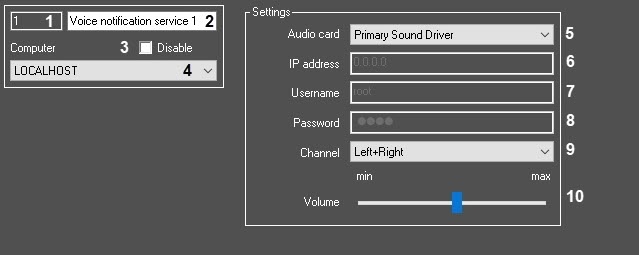
Table The table describes the setting parameters corresponding to the elements of the settings panel of the Voice notification service object.
№ | Parameter | Method for setting the parameter value | Parameter description | Representation | Default value | Value range |
1 | Identification number* | Automatically | Displays the identification number of the Voice notification service object in the digitalvideo surveillance system with the distributed architecture | Numbers, letters, periods, hyphen, dash, and underscore | - NA | Depends on the number of the Voice notification service objects in the digitalvideo surveillance system with the distributed architecture |
2 | Name* | Enter the value intoin the field | Sets the name to the Voice notification service object in the digitalvideo surveillance system with the distributed architecture | Latin, Cyrillic, and service characters | Voice notification service | A line containing a sequence of any characters (letters, digits, service characters except > and < characters), case-insensitive Number of characters—from 1 to 60 |
3 | Disable | Set the checkbox | Sets the state (enabled or disabled) of the Disables the Voice notification service object in the digitalvideo surveillance system with the distributed architecture | Boolean type | Clear | Set—the Set—the Voice notification service object is disabled and isn't used Clear—the Voice notification service object is enabled and used |
4 | Computer | Select the value from the list | Sets the Computer parent object of the digitalsystem with the distributed architecture ,to which the givengiven Voice notification service object belongs | Name of the Computer objects registered in the system | Name of the Computer parent object | Depends on the number of the Computer objects in the digitalvideo surveillance system with the distributed architecture |
The Settings group | ||||||
5 | Sound card | Select the value from the list | Sets the device to which the audio signal is sent for processing during voice notification | Names List of the audio device types of the audio devicesregistered in the system | Name of the installed sound card |
|
6 | IP address | Enter the value intoin the field | Sets the IP address of the LinuxHub and Axis devices. Note. This field is active ,if you select the LinuxHub or Axis item was selectedin thethe Sound card parameterSequence of numbersmenu | Non-negative integer | 0.0.0.0 Expression like: xxx.xxx.xxx.xxx | From 0.0.0.0 to 255.255.255.255, depending on the local network settings. Expressions like: xxx.xxx.xxx.xxx |
7 | Username | Enter the value intoin the field | Sets the username used to connect to the LinuxHub and Axis devices. Note. This field is active ,if you select the LinuxHub or Axis item was selectedin thethe Sound card parametermenu | Latin characters, digits, and service characters. | root | A line containing a sequence of any characters (letters, digits, service characters), case-sensitive. Number of characters—from 1 to 60 |
8 | Password | Enter the value intoin the field | Sets the password used to connect to the LinuxHub and Axis devices. Note. This field is active ,if you select the LinuxHub or Axis item was selectedin thethe Sound card parametermenu | Latin characters, digits, and service characters. | root | A line containing a sequence of any characters (letters, digits, service characters), case-sensitive. Number of characters—from 1 to 60 |
9 | Channel | Select the value from the list | Sets a channel in the Serverserver sound card to playbackplay back the audio signal | Name List of the audio channelchannels to which the sound is transmitted | Left+Right |
|
10 | Volume | Set the slider intoin the required position . | Sets the volume of the audio signal ,transmitted to the sound card. Note. This parameterThis field is active ,if theyou select sound card was selectedin thethe Sound card parametermenu | dB | 24 dB | Min—0 Max—45 |
*Name of the element isn't displayed in the settings panel of the given object.
Overview
Content Tools