
Go to documentation repository


Page History
...
- The standard method involves creating a bookmark in the archive mode. To do this:
Open the required layout.
Go to the archive mode (see Switching to the Archive mode).
Click the Timeline panel button.
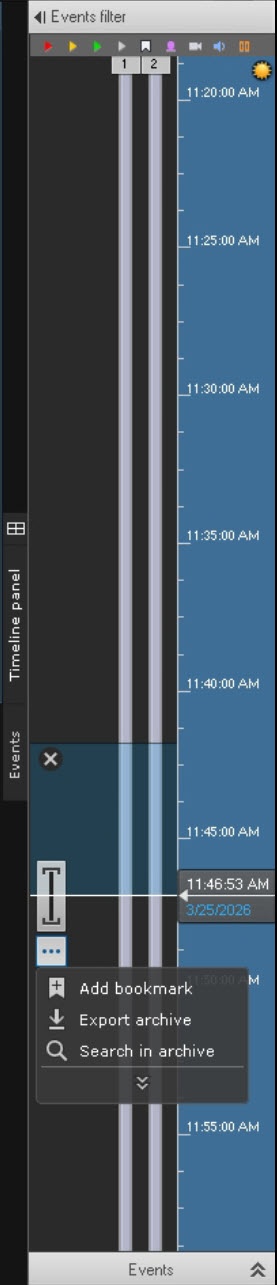
Select the bookmark interval on the timeline:
- Place the timeline pointer at the beginning of the interval.
- Click the
 button.
 - Scroll the timeline and place the pointer at the end of the interval.
- Click the
 button.
- Click the
 button.
 - In the window that opens, click Add bookmark.
- A window opens in which you must set the bookmark parameters specified in the table:
Parameter Value Description Add bookmark From [date], [month], [year], [hours], [minutes], [seconds] Specify the date and time interval for which you want to create a bookmark. When you create a quick bookmark, the date and time are selected from the moment of the freeze frame in the surveillance window
Note title Attention! Limit on bookmark length is two hours.
To Selected cameras
[Short camera name].[Camera name]
Select a specific camera or all cameras of the current layout Category
From the drop-down list, select one or more bookmark categories. Categories are used to group bookmarks by themes. You can create a category on the Optionstab. When you select a category, specifying a comment is optional
Comment
Enter a comment if necessary. The visible field contains four lines Highlight area
 Point area
 If necessary, select an area of interest on the frame. To do this:
- Click the corresponding button, then click any place on the frame. The selected element is displayed.
- Move the element to the required area of the frame. To do this, left-click the element and move the cursor without releasing it.
- Set the size of the element by stretching the anchor points.
With the help of an elliptical and rectangular mask area, you can hide certain parts of the image. This ensures confidentiality and protection of personal data
Info title Note - You cannot set a mask area in real time.
- For a single bookmark, you can set either an area of interest or a mask area.
- The mask area is displayed only in the main client. In the Web client and mobile client, there is no mask area on the video image.
- Only the users in the role settings of which the Yes value is set for the Show mask video in archive parameter can hide the masked area when viewing and exporting the archive (see Roles).
 Ellips area
 Rectangle area
 Ellips mask area
 Rectangle mask area
Advanced area settings Saved positions You can set several positions on different frames to display the same bookmark. To do this, go to another frame, move the element on it to the required area, and click the Add button. To delete a position, click
 . As a result, one bookmark is displayed for all added positions
Add bookmark Protect archive from deletion

By default, the checkbox is set and cannot be changed. To clear the checkbox and set the bookmark storage period, go to the Options tab → Bookmark parameters and clear the Mandatory archive protection from deletion checkbox. During archive FIFO overwriting, the protected bookmark isn’t deleted (see Configuring recording to an archive)
Note title Attention! Protection of archive from deletion is available only for object archives.

Indefinitely 
Select Indefinitely or For +- days. By default, the bookmark storage period is 30 days. If necessary, you can change it. The maximum storage period is 1095 days
Note title Attention! The option buttons are available for selection only if the Protect archive from deletion checkbox is set.

For +- days Confidential bookmark
By default, the checkbox is clear. If you want to make the bookmark confidential, set the checkbox - Click the Save
 button.
- You can create a quick bookmark at any time. To do this:
- Open the required layout.
- Click the
 button in the camera surveillance window.
 - A window opens in which you must set the bookmark parameters specified in the table:
Parameter Value Description Selected cameras
[Short camera name].[Camera name]
Select a specific camera or all cameras of the current layout Category
From the drop-down list, select one or more bookmark categories. Categories are used to group bookmarks by themes. You can create a category on the Optionstab. When you select a category, specifying a comment is optional
Comment
Enter a comment if necessary. The visible field contains four lines Highlight area
Point area If necessary, select an area of interest on the frame. To do this:
- Click the corresponding button, then click any place on the frame. The selected element is displayed.
- Move the element to the required area of the frame. To do this, left-click the element and move the cursor without releasing it.
- Set the size of the element by stretching the anchor points
Ellips area Rectangle areaConfidential bookmark
By default, the checkbox is clear. If you want to make the bookmark confidential, set the checkbox - Click the Save button.
...
Overview
Content Tools