The ONVIF-Server object is used to transmit a video signal from Axxon PSIM
...
via the ONVIF protocol.
The settings panel of the ONVIF-Server object is shown in the figure.
The Basic settings tab.
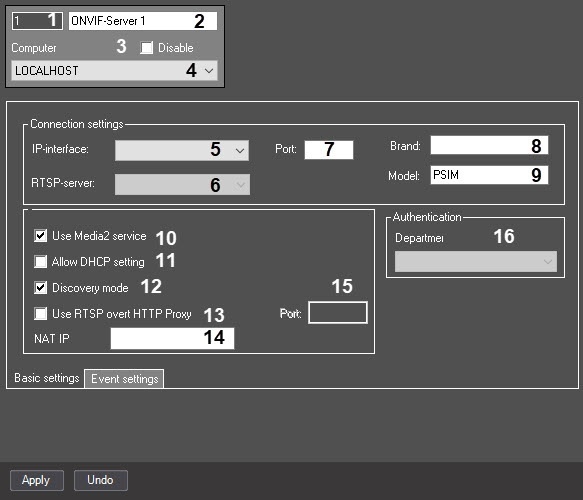 Image Modified
The Event settings tab.
 Image Removed
The table describes the setting parameters of the ONVIF-Server object.
| № | Parameter | Method for setting the parameter value | Parameter description | Representation | Default value | Value range |
| 1 | Identification number* | Automatically | Displays the identification number of the ONVIF-Server object in the |
digital | video surveillance system with distributed architecture | Numbers, letters, periods, hyphen, dash, and underscore |
-| NA | Depends on the number of the ONVIF-Server objects in the |
digital | video surveillance system with distributed architecture |
| 2 | Name* | Enter the value |
into | in the field | Sets the name of the ONVIF-Server object in the |
digital | video surveillance system with distributed architecture | Latin, Cyrillic, and service characters | ONVIF-Server | A line containing a sequence of any characters (letters, digits, service characters except > and < characters), case-insensitive. Number of characters—from 1 to 60 |
| 3 | Disable | Set the checkbox |
Sets the state (enabled or disabled) of the | Disables the ONVIF-Server object in the |
digital | video surveillance system with distributed architecture | Boolean type | Clear | Set—the ONVIF-Server object is disabled and not in use. Clear— |
the object object is enabled and in use. |
| 4 | Computer | Select the value from the list | Sets the Computer parent object in the |
digital system with distributed architecture to which the |
given given ONVIF-Server object belongs | Names of the Computer objects registered in the system | Name of the Computer parent object | Depends on the number of the computers in the |
digital | video surveillance system with distributed architecture |
| The Basic settings tab |
| 5 | Port |
Specify | Enter the value in the field | Sets the port number used to connect to the |
Server greater than 0- | 1–65535 |
| 6 | IP-interface | Select the value from the list | Sets the network interface (network adapter) used to connect to the |
Server| server | List of available network interfaces |
-| NA | The list of values depends on the network adapters available in the system |
| 7 | RTSP-server | Select the value from the list | Sets the RTSP-server object, the settings of which |
will be | are applied by the ONVIF-Server object while transmitting the video signal | Names of the RTSP-server objects registered in the system |
-| NA | Depends on the number of the RTSP-server objects created in Axxon PSIM |
| 8 | Use Media2 service
| Set the checkbox | Enables the ONVIF 2.X standard instead of ONVIF 1.X | Boolean type | Clear | Set—the ONVIF 2.X standard is used. The video is transmitted in the H264, H265, MJPEG |
or , or MPEG4 formats Clear—the ONVIF 1.X standard is used. The video is transmitted in the MPEG, MJPEG, or H264 formats |
| 9 | Allow DHCP setting
| Set the checkbox | Enables the DHCP support | Boolean type | Clear | Set—DHCP is used Clear—DHCP isn't used |
| 10 | Discovery mode | Set the checkbox | Enables the WS-Discovery mode | Boolean type | Set | Set—the WS-Discovery mode is enabled Clear—the WS-Discovery mode is disabled |
| 11 | Brand | Enter the value |
into | in the field | Sets the name of the brand that |
will be | is displayed in the third-party clients that support the video transmission via the ONVIF protocol | Latin, Cyrillic, and service characters |
AxxonSoft Ltd.| AxxonSoft | A line containing a sequence of any characters (letters, digits, and service characters) |
| 12 | Model | Enter the value |
into | in the field | Sets the name of the model that |
will be | is displayed in the third-party clients that support the video transmission via the ONVIF protocol | Latin, Cyrillic, and service characters | PSIM | A line containing a sequence of any characters (letters, digits, and service characters) |
| 13 | Department | Select the value from the list | Sets the department in which the users |
will be | are created when they are added via |
the | the ONVIF-Server interface | Names of the Department objects registered in the system |
-| NA | Depends on the number of the departments registered in Axxon PSIM |
| 14 | Use RTSP over HTTP Proxy | Set the checkbox | Redirects all RTSP-Server and ONVIF-Server requests to the specified port for the operation behind NAT | Boolean type | Clear | Set—the RTSP-Server and ONVIF-Server requests are redirected to the specified port (item 15) Clear— |
the the RTSP-Server and ONVIF-Server requests are transmitted to the port specified in the Connection settings group (see item 5 above) |
| 15 | Port | Enter the value |
into | in the field | Sets the port number for the RTSP-Server and ONVIF-Server requests redirection for the operation behind NAT | Integer |
greater than 0- | 1–65535 |
| 16 | NAT IP address | Enter the value |
into | in the field | Sets the IP address that the ONVIF Server will use in responses to Clients if the Clients are behind NAT | IP address |
-| NA | Depends on the network settings behind NAT |
The Event settings tab*Name of the element isn't displayed in the settings panel of the given object.
The Event settings tab.
 Image Added
| № | Parameter | Method for setting the parameter value | Parameter description | Representation | Default value | Value range |
| The ONVIF-server event group |
| 17 | ONVIF-server event | Select the value from the list | Sets the ONVIF-server event according to the ONVIF specification | List of available events |
-| NA | According to the ONVIF specification |
| 18 | Computer | Select the value from the list | Sets the Computer object on the basis of which the object is created, that is |
the in the | the Computer objects registered in the system |
-| NA | Depends on the number of the computers in the |
digital | video surveillance system with distributed architecture |
| 19 | Type | Select the value from the list | Sets |
the | the event type, which is the event source |
in the | the object types registered in the system |
-| NA | Depends on the number of the created objects in the |
digital | video surveillance system with distributed architecture |
| 20 | Number | Select the value from the list | Sets |
the | the object number, which is the event source |
in | in Axxon PSIM | Sequence of numbers |
-| NA | Depends on the number of the created objects in the |
digital | video surveillance system with distributed architecture |
| 21 | Name | Automatically | Sets |
the | the object name, which is the event source |
in the | the object of the selected type registered in the system |
-| NA | Depends on the number of the created objects in the |
digital | video surveillance system with distributed architecture |
| 22 | Event | Select the value from the list | Sets |
the in | in Axxon PSIM | Event names received from the objects of the selected type |
-| NA | Depends on the object type |
| The Transfer parameters group |
| 23 | ONVIF-event parameter name | Automatically | Sets the ONVIF-event parameter |
name | name according to the specification | Parameter names of the selected ONVIF-event |
-| NA | According to the ONVIF specification |
| 24 | Event parameter name | Enter the value |
into | in the field | Sets the event parameter name in Axxon PSIM |
Event parameter names in Axxon PSIM | - | Depends on the object type | Latin, Cyrillic, and service characters | NA | A line containing a sequence of any characters (letters, digits, and service characters) |
*Name of the element isn't displayed in the settings panel of the given object.


