
Go to documentation repository


Page History
...
| Section | ||||||||||||||||||||
|---|---|---|---|---|---|---|---|---|---|---|---|---|---|---|---|---|---|---|---|---|
|
...
알람 시작

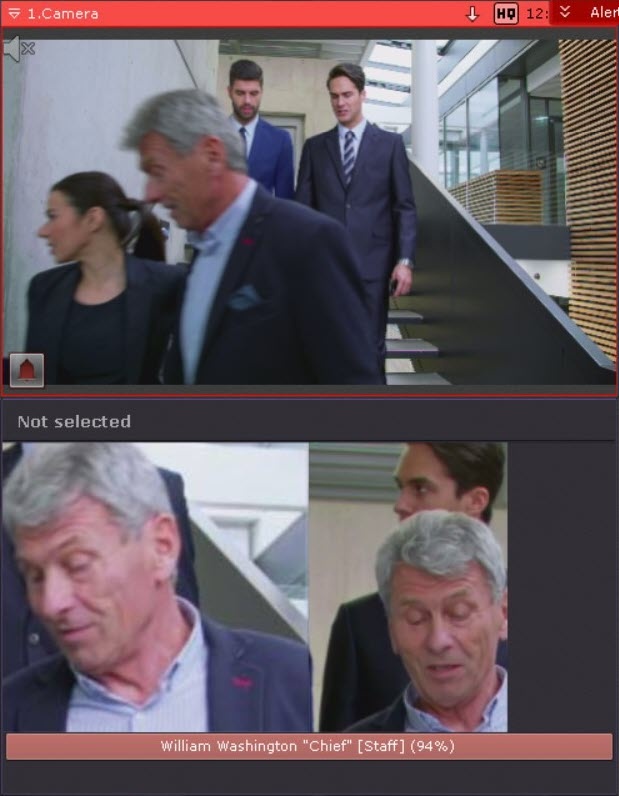
This macro can be used together with the Dialog Board (see 이 매크로는 대화 상자 보드와 함께 사용할 수 있습니다 (Configure the Dialog Board 참조).If the Dialog Board is configured to display an alarm and linked with a video camera (see Linking cells), then when a face from the list is recognized, the following information will be displayed on the Dialog Board:
대화 상자 보드가 알람을 표시하도록 설정되고 영상 카메라와 연결된 경우 (Linking cells 참조), 목록에 있는 얼굴이 인식되면 대화 상자 보드에 다음 정보가 표시됩니다.
- reference photo from the face list;
- an enlarged image of the recognized face in the frame;
- the name of the recognized person, the comment in quotation marks, the name of the face list in square brackets, and the percentage of similarity with the reference face in parentheses (see Faces 참조).
Switching the output on for the authorized persons
...
If the e-mail is sent via the SMTP Server (see The E-mail notifier object 참조), then 3 files will be attached to the message:
...
Overview
Content Tools