
Go to documentation repository


Page History
...
- Go to the Hardware tab of the System settings dialog box (1).
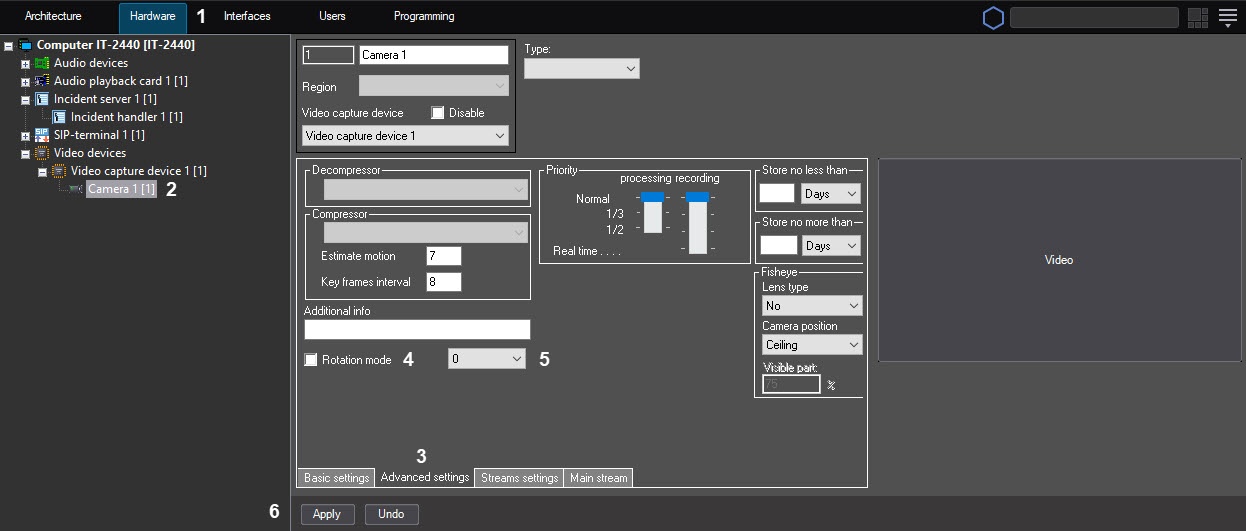
- Select the Camera object corresponding to the video camera from which the video image is to be rotated while displaying (2).
- Go to the Advanced settings tab (3).
- Set the Rotation mode checkbox to activate the rotation function (4).
- From the drop-down list, select the rotation angle (5).
- To save settings in the Axxon PSIM software, click the Apply button (6).
| Info | ||
|---|---|---|
| ||
| On default the video signal is displayed in the Video surveillance window in initial non-rotated state. To rotate the video image, select the Pan function in the Processing sub-menu of the Video surveillance window − see the Operator's Guide document. |
...
Overview
Content Tools