
Go to documentation repository


Page History
...
As soon as the Client is started, the system automatically starts a search for an active kernel of the server program.

| Info | ||
|---|---|---|
| ||
When the Client is started for the first time, the search uses IP address 127.0.0.1 (localhost). In all following cases the search will use the last entered IP address. |
If the program kernel is not found, the Operator will be suggested to manually enter the IP address or DNS name of the computer on which the server part of the program functions, or exit the program.

To complete the operations, click the Exit button.
...
If it is provided by the settings, a drop-down list with the last IP addresses used for the connection will be displayed and you will be able to select one of them:

If the active program kernel is found at the given IP address or DNS name, the system will automatically connect to the found program kernel. If required, a login and password will be requested to access the server part of the program.
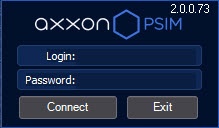
After you entered the login and password, click the Registration button. If connection is established successfully, the user interface of the Client will be downloaded. Otherwise, the system will request the credentials again.
Overview
Content Tools