
Go to documentation repository


Page History
...
- Create the Video capture device object on the basis of the Computer object on the Hardware tab of the System settings dialog window (1).

- Go to the settings panel of the created object.
- From the Type dropdown list (2), select the RTSP value.
In the IP address field (3), enter the address of the RTSP stream. The length of the address must not exceed 100 characters.
The format of the address depends on the camera model and its firmware. It is specified in the technical documentation of the vendor. Generally, the address looks like this:
rtsp://[<username>:<password>@]<IP address of video source >:<port>/<path_to_stream>.
For the Axis 210A camera, the address of the RTSP stream looks like this:
rtsp://root:password@10.0.11.121:554/mpeg4/media.ampInfo title Note The address to access the RTSP stream delivered by the RTSP server of Axxon PSIM, looks like rtsp://192.168.0.3:554/1. When the RTSP server operates in the Multicast mode, you cannot access it via the RTSP grabber. Besides, starting with the Drivers Pack v. 3.2.28.1518 version, the system supports receiving multiple streams via the RTSP protocol (multistreaming). In this case, the maximum possible number of streams is three. RTSP stream addresses are separated in the IP address field by the semicolon ";".
Info title Example To get video from two streams, enter rtsp://admin:admin@10.0.26.16/live/h264;rtsp://admin:admin@10.0.26.16/live/mjpeg in the IP address field.
To get video from three streams:
rtsp://admin:admin@10.0.26.16/live/h264;rtsp://admin:admin@10.0.26.16/live/mjpeg;rtsp://admin:admin@10.0.26.16/live/mpeg4Starting with the Drivers Pack 3.62.2953 version, the system supports receiving the RTSP stream over HTTPS. To do this, you must set the HTTPS transport protocol using the RTSP registry key beforehand (for more information about this parameter, see Changing the transport protocol used by IP-device). Example of the link for receiving the RTSP stream over HTTPS:
https://192.168.0.3:443/profile1/media.smp;
https://admin:admin@192.168.0.3:443/profile2/media.smp.Note title Attention! When you transmit the username or password that contains invalid characters, including "@" ,via URL, they must be screened using ASCII codes (hexadecimal format). The "@" character is screened as %40. For example, when you connect the device over RTSP the link can look like "rtsp://admin:New%40edge@192.168.0.75:554/RVi/1/1". However, if this data is in the login and password fields of the Video capture device object in Axxon PSIM, they stay the same. In this case, "admin" and "New@edge" correspondingly.
- Click the Apply button to save the settings of the Video capture device object (4).
- Create the Camera object on the basis of the Video capture device object (5)

- Configure the created Camera object.
- Click the Apply button (6).
- Click the Video field to check if the video is available (7).
...
To receive an audio stream from a camera, you must create and configure the Audio card and Microphone objects for the audio stream from a camera that is received via the RTSP protocol. For this, select the RTSP type of the audio card (see Registration of audio cards and microphones in Axxon PSIM™ software).
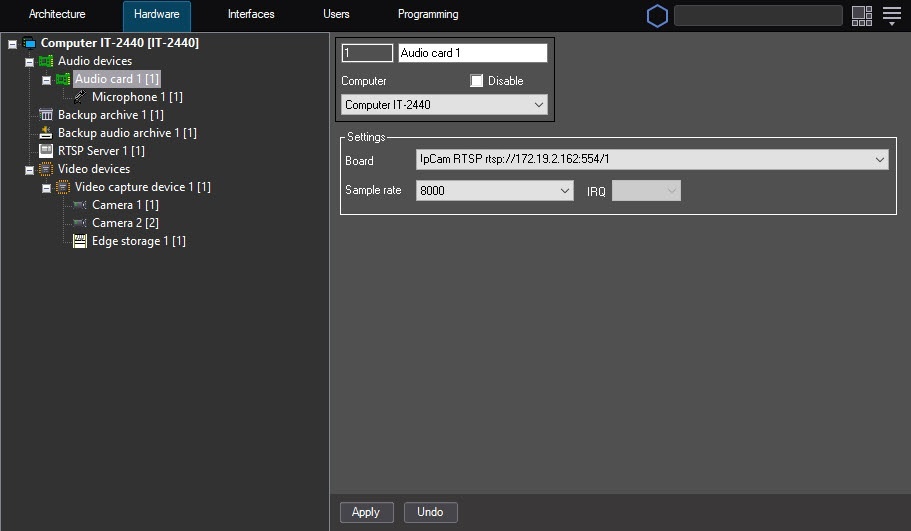
Further actions with the audio stream are performed using the created Microphone object.
...
Overview
Content Tools