
Go to documentation repository


Page History
The Captioner object is a child object of the Camera system object . It and is designed for configuring titles display on a video recording and maintaining titles to configure the captions output on the video image coming from the camera as well as to maintain the captions database.
This object allows setting the limits of titles caption output, font parameters, and color rules of wordsword highlighting. Titles Captions are output into the field on a video recording from a displayed in the rectangular area on the video image that is coming from the camera.
If you don't create the Captioner object is not created in the system, then titles are not captions aren't displayed.
| Info | ||
|---|---|---|
| ||
| Titling on a video recording can be performed, for instance, using the You can put captions on the video image, for example, using scripts or programs in the Axxon PSIM™ PSIM embedded programming language (see see The Script object. Programming using the JScript language and Guide for creating scripts (programming)). |
To configure the Captioner object, do the following:
- Go to the Hardware tab of the System settings dialog box window (1).
Create the Captioner object on the base basis of the Camera object (2).

- Specify the parameters of the titles captions output window (3):
- Set the coordinates of the upper left corner of the titles captions output window: the X (the horizontal indent from the left border of the screen) and Y (the vertical indent from the top border of the screen) fields.
- Set measurement the size of the titles captions output window: the W (the width of the titles captions output window) and and H (the height of the titles captions output window) fields.
- Specify the font parameters of font used for titles caption output:
- Click the
 button (4).
 - In the appeared Font standard Windows dialog boxwindow that opens, specify the required font parameters and click OK.
- Double left-click the Color field (5). In
- In the appeared
- Color standard Windows dialog box
- window that opens, select the required color and click OK.
- Click the
- Specify the parameters for words rules of word highlighting (6):
- Right-click the Color of Highlight words field, and select Add in the appeared context menu that appears, select the Add item.

- In the appeared dialog box, type-in a window that appears, enter the required word and click click OK. The entered word is added to the Color of Highlight words table table.
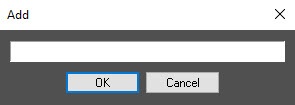
- Specify the color with which the word will be is highlighted by double left-clicking the Color field next to the specified entered word. In In the appeared Color standard Windows dialog boxwindow that opens, select the required color and click OK.If
- Set the full string with a word is to be highlighted, then set the Full string checkbox.
- If the case of word characters is to be matched, then set the Match case checkbox.
- Full string checkbox if you want to highlight not only the required word but also the entire line that contains this word during the output.
- Set the Match case checkbox if you want to match the case of the word characters.
Repeat steps a-e Repeat steps 5.1-5.5 for all required words.
Info title Note Use the context menu for operations with the words entered in the table (right-click a the required word). If you want to clear the Highlight words table is to be cleared, then click the Clear button.
- Right-click the Color of Highlight words field, and select Add in the appeared context menu that appears, select the Add item.
If necessary, specify the maximum number of days as the difference between the newest and the oldest entry in the titles captions database for the given captioner in the the Captions archive size__days field (7). Entries which that were added earlier than the specified number of days before the most recent entry will be are automatically deleted "in a loop". If the you specify the 0 (default) value is specified, the entries are deleted " in a loop " together along with the video archive.
Info title Example For example, the titles captions archive size is 1 day. On Friday, the titles captions from the Captioner 1 were are added to the titles captions database. On Saturday and Sunday the the camera was is turned off, and the titles were not captions aren't recorded. On Monday the camera was is turned on, and and the titles friday captions from the Captioner 1 from Friday remained remain in the titles captions database until the new ordinary record was is added to the titles captions database of the Captioner 1. In Within the 3 minutes after the new record was is made on Monday, the captions from Friday were are deleted.
- Click the Apply button (8).
The Configuring the Captioner object is now configuredcomplete.
| Info | ||
|---|---|---|
| ||
Use the Copy and Paste buttons to import all settings from one Captioner object to another. The Color of words table The Highlight words table can be saved and imported loaded from a the file. The The Export and Import buttons are used to save and import the table, respectively. |
Overview
Content Tools