
Go to documentation repository


Page History
...
- Go to the settings panel of the HTML Interface object.
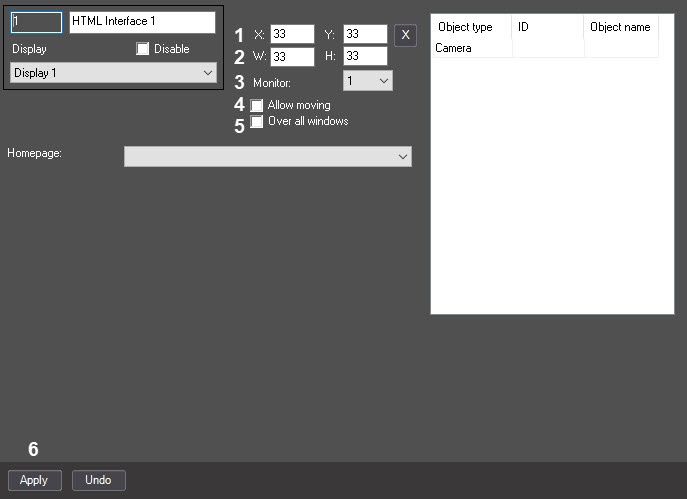
- In the X: and Y: fields, specify the coordinates of the upper left corner of the HTML interface window (1). Coordinates are counted from the upper left corner of the display and expressed as a percentage of the screen width and height, respectively.
- In the W: and H: fields, specify the width and height of the HTML interface window as a percentage of the screen width and height, respectively (2).
- From the Monitor drop-down list, select the number of the monitor on which the HTML Interface object must be displayed (3).
- Set the Allow moving checkbox (4) if you want to allow the operator to change the position of the HTML Interface window by using the mouse.
- Set the Over all windows checkbox (5) if you want to display the HTML Interface window on top of all windows.
- Click the Apply button (6).
...
Overview
Content Tools