
Go to documentation repository


Page History
...
| Note | ||
|---|---|---|
| ||
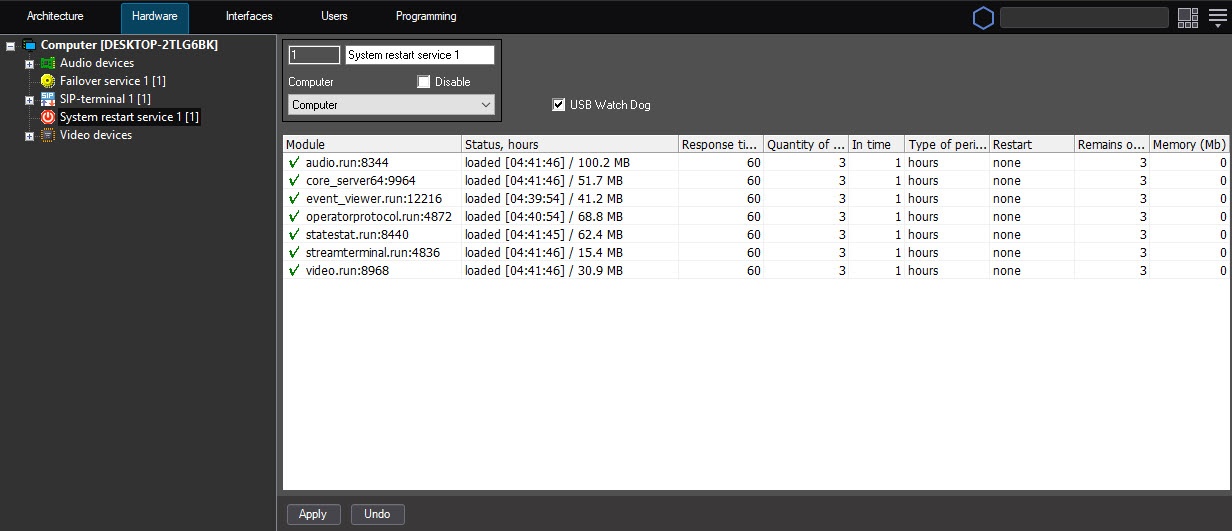
The system restart service displays only those Axxon PSIM modules the processes of which are created directly under the SlavePSIM_Host.exe process process, which, in its turn, is running under the Psim.exe process. |
...
- Restarting a computer (the hardware workability control requires the connection of additional devices). In this case, the computer restarts if the SlavePSIM_Host.exe process process isn't active.
- Restarting a module. In this case, if there is no response from the module, then only the module that doesn't respond to requests restarts.
- Restarting a core. In this case, the Axxon PSIM core restarts if there is no response from the module.
You can configure the system restart service on the settings panel of the System restart service object. This object is created on the basis of the Computer object on the Hardware tab of the System settings dialog window.
Overview
Content Tools