
Go to documentation repository


Page History
| Section | |||||||||||||||||||||
|---|---|---|---|---|---|---|---|---|---|---|---|---|---|---|---|---|---|---|---|---|---|
|
Axxon PSIM allows allows sending text messages, images, or and geolocation to the Telegram chat on any event from any object created in the Axxon PSIM objects registered in the objects tree. After configuration, the message sending is initiated by a macro or a script from the Axxon PSIM script.
Create the Before you start configuring the message sending from Axxon PSIM to Telegram, you must create a bot and the group chat with it this bot in Telegram before configuring the message sending from Axxon PSIM to Telegramthe messenger. You can use the pre-created and configured bot configured @Axxon PSIMNotificationsBot. For the distribution package and the user guide for Telegram messenger, see the developer official website telegram.org official developer website.
Configuring message sending from Axxon PSIM to Telegram
To configure the message sending from Axxon PSIM to Telegram, do the following:
- Create the Telegram bot object (1) on the basis of the Computer object on the Hardware tab of the System settings dialog box (1)window.

- If you need to use the Proxy server should be used to send messages, enter the Proxy server address in the the Proxy field (2).
In the Bot ID field (3), enter the Telegram bot identification number.
Info title Note The identification number is provided when creating the you create a bot.
@Axxon PSIMNotificationsBot bot identifier is: 474299886:AAGFKHcC8ARX9ziXgTlvKnwNhxnwlDhmD3M
In the Chat ID field (4), enter the chat identification numberidentifier.
Info title Note To find out the chat identifier of the chat, you can add the @RawDataBot bot to the chat.After adding When you add it, the bot will send sends a message to the chat containing the result of executing the getUpdates function. Find ChatId in that message. Then you can remove the @RawDataBot bot can be removed from the chat.
- Click the Apply button (5).
Configuring the message sending from Axxon PSIM to sending to Telegram is complete.
Examples of macros for sending a message to Telegram
Macro to send a the text message:
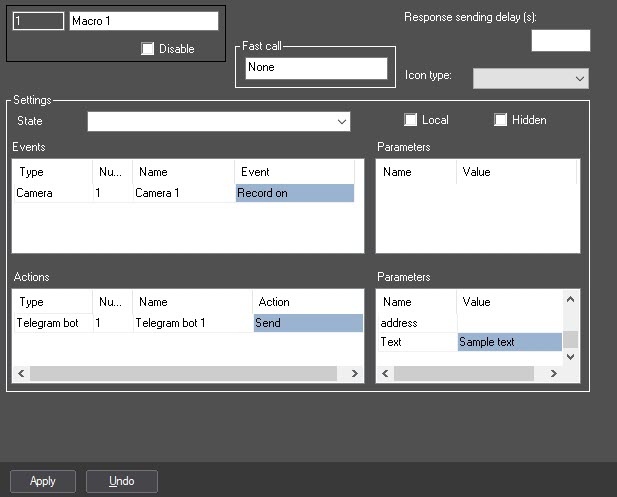
Macro to send an imagemedia files:

Macro to send geolocation:
...
Overview
Content Tools