
Go to documentation repository


Page History
...
- Set the Use checkbox (1) on the settings panel of the Incident server object.
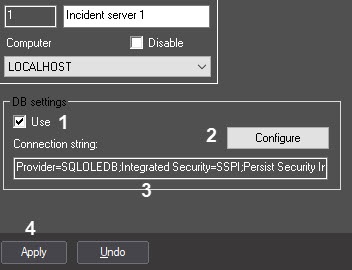
- Set the connection parameters in one of the following ways:
- Click the Configure button (2) and set the connection parameters to the external database using the standard dialog window, see Configuring connection to external database in dialog mode.
In the Connection string field (3), set manually the connection parameters separated by a semicolon without spaces.
All parameters, except for Integrated Security, are mandatory. Example:Parameter Possible values Provider - SQLOLEDB.1 when you use the MS SQL Server database format;
- Microsoft.Jet.OLEDB.4.0 when you use the MS Access database format
Integrated Security SSPI when you log in on the MS SQL server using the Windows OS account. If you use the MS SQL server and this parameter is missing, then username (login) and password are used for authentication.
When you use the MS Access database format, this parameter isn't required
Persist Security Info - True—permission to save the password for automatic connection to the database;
- False—prohibition to save the password for automatic connection to the database
Data Source The name of the MS SQL server used to manage the database, or the path to the MDB file of the MS Access database format
Provider=SQLOLEDB.1;Integrated Security=SSPI;Persist Security Info=True;Data Source=SQLEXPRESS2014SQLEXPRESS2019
- Click the Apply button (4).
...
Overview
Content Tools