
Go to documentation repository


Page History
...
- From the Security Level 1:1 (Verify) drop-down list, select the verification quality level from 1 to 9 if only one type of authentication is used. The default value is 4.
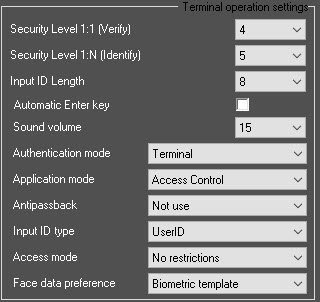
- From the Security Level 1:N (Identify) drop-down list, select the authentication quality level from 1 to 9 if several authentication types are used. The default value is 5.
From the Input ID Length drop-down list, select the user ID length: from 4 to 8 characters.
Note title Attention! To ensure the terminal operation with ACFA PSIM, it is necessary to select the 8 value. Also, the Input ID Length must be set to 8 in the terminal itself.
- Set the Automatic Enter key checkbox to enable the automatic key entry from the terminal keyboard (F1-F4 buttons).
- From the Sound volume drop-down list, select the terminal speaker volume level: from 0 to 20.
- From the Authentication mode drop-down list, select the mode of authentication and terminal operation:
- Server/Terminal—the decisions are made by the Server, and if it is not available, then by the terminal.
- Terminal / Server—the decisions are made by the terminal, and if it is not available, then by the Server.
- Server—the decisions are made by the Server.
- Terminal—the decisions are made by the terminal.
Offline mode—the offline mode of the terminal.
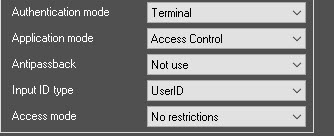
Info title Note In the offline mode, the terminal cannot be managed from the ACFA PSIM Server.
- From the Application mode drop-down list, select the terminal operating mode:
Access Сontrol—access point mode.
Note title Attention! To ensure the terminal operation with ACFA PSIM, it is necessary to select the Access Сontrol operation mode.
- Time/Attendance—working time tracking mode.
- Drinking Water—breathalizers compatibility mode.
- From the Antipassback drop-down list, select the double-entry control mode:
- Not use—not used.
- Access when disconnected—allow entry if the connection with the Server is lost.
- Prohibit when disconnected—prohibit entry if the connection with the Server is lost.
- From the Input ID type drop-down list, select the type of user identifiers:
- UserID—custom user identifiers.
- UniqueID—unique user identifiers specified in the terminal.
- From the Access mode drop-down list, select the access mode provided by the terminal if there is no keyboard for entering numbers on the terminal:
- No restrictions—no restrictions.
- Only fingers and password—only fingerprints and password.
- Click the Apply
 button to apply the settings.
Overview
Content Tools