
Go to documentation repository


Page History
...
- On the settings panel, go to the Authentication tab.
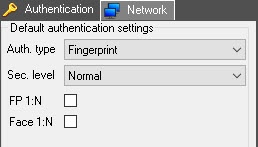
- From the Auth. type drop-down list, select the default authentication type. The selected access type will be is used to write users to the Virdi terminal (see Managing the configuration of the Virdi Terminal).
- From the Sec. level drop-down list, select the default required authentication quality level , from Lowest to Highest.
- Set the FP 1:N checkbox , so that the fingerprint is requested first, and then it is checked against the entire fingerprint database of the device. The check may can take a long time, depending on the number of fingerprints in the database.
- Set the Face 1:N checkbox , so that the face is recognized first, and then this face is checked against the entire face database of the device. The check may can take a long time, depending on the number of faces in the database.
- To save the changes, click the Apply
 button.
Overview
Content Tools