
Go to documentation repository


Page History
...
| Section | |||||||||||||||||||||
|---|---|---|---|---|---|---|---|---|---|---|---|---|---|---|---|---|---|---|---|---|---|
|
| Tip |
|---|
Alarm initiation

You can use this macro together with a Dialog Board (see Configuring a Dialog Board). To configure a Dialog Board to display an alarm, do the following:
- Add a Dialog Board to a layout (see Configuring a Dialog Board).
- Link the Dialog Board to a Surveillance window (see Linking cells).
- On the Dialog Board, select from the list the event type Camera: Alarm initiated by macro that you want to be displayed on the Dialog Board.
- Click the Add button.
- On the Dialog Board, click the
 button and select the Alarm element.
 - Click the Save
 button.
As As a result, when a face from the list is recognized, the following information is displayed on the Dialog Board:
- reference photo from a face list;
- an enlarged image of the recognized face in the frame;
- the name of the face list, full name of the recognized person in square brackets, and the percentage of similarity with the reference face in parentheses (see Faces).
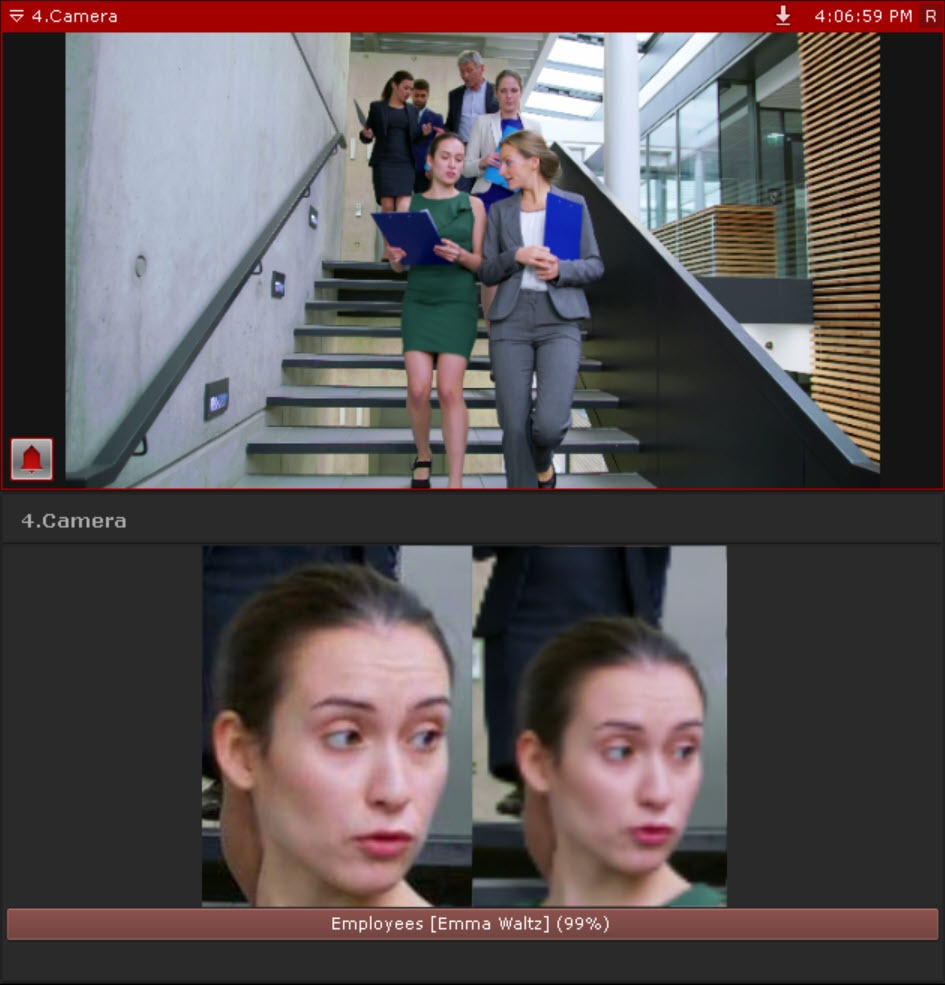
When an alarm is initiated by this macro, you can view additional information about a recognized face on the Alert panel (see Alert panel) when you hover the mouse cursor over the video.

You can specify additional information about faces in AxxonNet (see Configuring a list of faces).
...
Switch on the output for the authorized persons

If only an authorized list of persons has access to the room, the system initiates an automatic reaction if the recognized face is in the authorized list.
...
Send an email

If an email is sent via the SMTP Server (see Email notifier), then two files are attached to the message:
- full frame at the moment of face recognition;
- an enlarged image of the recognized face in the frame.
...
Start export

As with the email message, three files are exported when exporting an image upon face recognition event:
- full frame at the moment of face recognition;
- reference photo from the face list;
- an enlarged image of the recognized face in the frame.
Overview
Content Tools