
Go to documentation repository


Page History
...
- Create the RISCO Panel parent object on the basis of the Axacfa object on the Hardware tab of the System Settings window.

- In the IP Address field, specify the IP address of the RISCO Panel (AxACFA) device.
- In the Port field, specify the number of the port to connect the RISCO Panel (AxACFA) device.
- In the Access code field, specify the access code to the RISCO Panel (AxACFA) device.
- Click the Apply button to save the connection settings.
- Click the Download Configuration Get Configuration button to download the configuration and build the hardware tree.
A hardware tree will be built: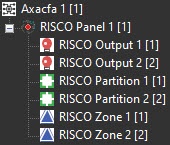
Configuration of the RISCO Panel (AxACFA) parent object is complete.
Overview
Content Tools