
Go to documentation repository
| Section | |||||||||||||||||||||
|---|---|---|---|---|---|---|---|---|---|---|---|---|---|---|---|---|---|---|---|---|---|
|
When configuring you configure the LPR channel with the activated activated AUTO-Uragan/VT/RR/IV module, it is necessary to you must specify the country to be able to identify the plates belonging to that country. whose license plates must be recognized.
| Info | ||
|---|---|---|
| ||
The list of the supported countries is given in the description of the functional characteristics of the corresponding LPR module in Configuring the program modules. The license plates of the selected country will be are recognized with maximum probability. The plates which do not license plates that don't fit the plate format of the selected country will still be recognized, although with lesser probability. |
When configuring you configure the LPR channel with the activated AR-Auto/AR-Railway module, it is necessary to you must specify the license plate recognition SDK.
...
To select the country, do the following:

From the Country drop-down list, select the installed country for license plate recognition.
| Note | ||
|---|---|---|
| ||
The By default value is available for the IVmodule. In this case it will be is possible to recognize license plates of all supported countries, though the recognition quality may become worsecan decrease. | ||
| Note | ||
| ||
There is a special utility for the VT and AUTO-Uragan modules (see PatCgfr.exe utility for active patterns configuration or PresetEditor.exe utility for active patterns configuration of VT module) using which it is possible to you can set template configurations. Each configuration determines what license patterns will be recognized by the camera. Using various configurations it is possible to , you can set various recognition rules for various cameras. | ||
| Info | ||
| title | NoteIf the software module supports the two-line license plates plate recognition, then in order to display them in the Event Viewer in viewer in two lines, it is necessary to set the RemoveNewLine registry key value to 0 (for details, see Registry keys reference guide, for more information about working with the registry, see Working with Windows OS registry). |
Selection of a country for license plate recognition is complete.
...
To select the license plate recognition SDK, do the following:
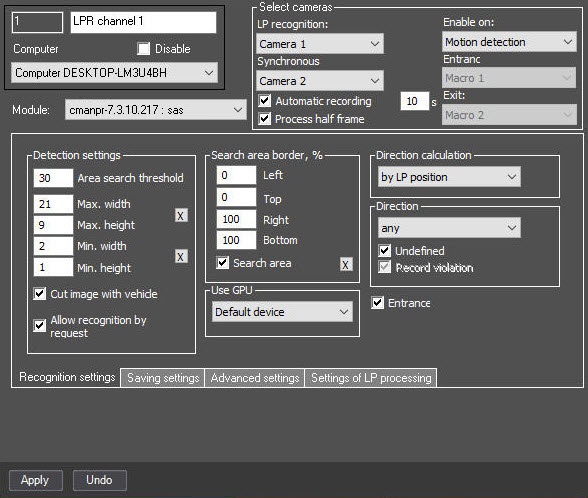
From the Module drop-down list, select the installed SDK for license plate recognition.
| Info | ||
|---|---|---|
| ||
To add the SDK for license plate recognition, it is necessary to you must download the required SDK from the the AxxonSoft website and install them it using the EngineManager utility. The procedure of installing the recognition engines using the EngineManager utility is described in the engine_install_windows.txt file located in the folder with the corresponding recognition engine. If the AR-Auto module is activated, then the cmanpr-7.2.7.108: general SDK is used by default for recognizing all Latin characters of the license plates (for example, corresponding to countries such as Argentina, India, Africa, and Singapore), although the country recognition function is not used. The Hazard Identification Number Recognition Engine (ADR) SDK can be added to the list of the countries as a separate "country". This SDK is named cmanpr- <version number>: latin_eadr in the list of countries. If you select it is selected as the country issuing the license plate, the recognition module will be able to can identify the license plates of the states using the Latin alphabet, as well as the specialized license plates of vehicles carrying hazard hazardous goods, with detecting detection and recognizing recognition of the type of cargo being transported. The information about the transported cargo will be displayed by the Vehicle Tracer module in in the list of vehicle parameters , and also sent in the event about the recognized number. Two-line license plates are supported in ARthe AR-Auto module when the cmanpr-<version number> : arab recognizer is selected. In the Online online monitor, the recognized Arabic license plate numbers plates are always displayed in two lines. The first line begins with the Arabic numbers, and then the Arabic letters are displayed. The second line, by default, begins with the Latin letters, then numbers. To display in the second line the Latin numbers first , and then the letters, it is necessary to set the value of the string parameter of the VehiclePlateSearch.RightToLeft registry key to 0 (for details, see Registry keys reference guide, for more information about working with the registry, see Working with Windows OS registry).
|
Selection of the license plate recognition SDK is complete.


