In Auto PSIM, you can configure LP license plate recognition by macros and motion detection. To do this, do the following:
- Go to the settings panel of the LPR channel object, corresponding to the activated module (see Activating the software module used for identifying license plates).

- From the Enable on drop-down list, select:
- Disabled—license —License plate recognition by macros or motion detection is disabled (by default). The LPR channel scans each incoming frame;.
- Motion detection— license —License plate recognition by motion detection is enabled. It is used to reduce the load on the Server;server.
- Macros—license —License plate recognition by macros is enabled. When you select this option, the Entrance and Exit drop-down lists become available.
- from From the Entrance drop-down list, select a macro that starts the license plate recognition;.
- from the Exit drop-down list, select a macro that stops the license plate recognition.
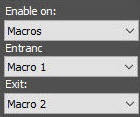
- Click the Apply button to save the settings.
Setting up LP license plate recognition by macros and motion detection is complete.
| Info |
|---|
|
- LP License plate recognition by motion detection is implemented only in the AUTO-Uragan, AR-Auto, AR-Railway, VT modules.
- When you enable license plate recognition by motion detection, the LPR channel scans the video image only when the main motion detection detector of Axxon PSIM is in the Alarm state (when motion is detected in the camera’s FOV). If the main motion detection detector isn’t alarmed, the LPR channel doesn’t scan video images to recognize vehicle license plates.
|


