
Go to documentation repository


Page History
...
This setting is used to automatically connect:
- the The client to the server without having to re-enter the server name, username, and password when starting the app;.
- the The client to servers that belong to different domains (see Cross-System client);.
- the The client to the nodes of the failover system (see Configuring Failover VMS).
...
When you use the Cross-System client, select the main domain after you add all servers to the list. To select the main domain, set the Main checkbox in the corresponding column of the server that is on the domain.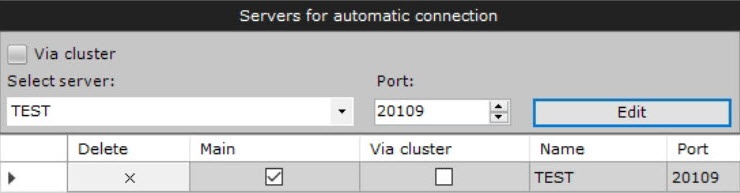
When connecting, the client will use the parameters (maps, layouts, user permissions) of the main domain.
Configuration of automatic connection of the client to the nodes of the
...
failover system
If you want to configure automatic connection to a node of the failover system:
...
Configuration of automatic connection of the client to the node of the Failover failover system is complete.
Configuration of automatic connection to the backup server
To automatically connect to the backup server if the main server is unavailable:
- In the Automatic connection parameters group, enter the IP address and port of the main server and the name of the node.
- Click the Add
 button.
 - Set the checkboxes in the Main and Via cluster columns.
- Select a backup server from the list or enter its IP address and node name.
- If necessary, change the default port for the backup server in the Port field.
- Click the Add button.
- Click the Apply
 button.
...
Overview
Content Tools