Unable to render embedded object: File (books.jpg) not found.
Go to documentation repository

Page History
The Events filter component is used to select Filter component allows selecting the type alarm of events to be that are displayed on the archive navigation panel.
To select a type of alarm events, you must perform the following stepsan event type:
- Click the Events filter button (1). The Events filter window will then be displayed (2).
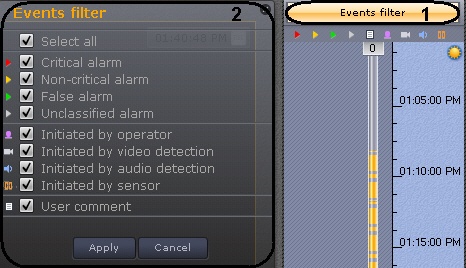
- Select the check boxes for the types of alarms which should be displayed on the archive navigation panel, according to their status:
- Critical alarm
- Non-critical alarm
- False alarm
- Unclassified alarm
- Select the check boxes for the types of alarms which should be displayed on the archive navigation panel, according to the cause of their initiation:
- Initiated by operator
- Initiated by video detection tool (basic, situation analysis, or embedded)
- Initiated by audio detection tool (basic, situation analysis, or embedded)
- Initiated by sensor
Info title Note. By default, all check boxes are already selected. - Select the check box to display operator comments.
- Click the Apply button.
| Info | ||
|---|---|---|
| ||
To close the window without saving changes, click Cancel or  . . |
...
Overview
Content Tools