
Go to documentation repository


Page History
W Pakiecie Oprogramowania Axxon Next kilka typów narzędzi może służyć do przetwarzania dostarczanych danych:
- Narzędzia detekcji analizy sytuacji.
Narzędzia rozpoznawania twarzy.
Narzędzie rozpoznawania numerów tablic rejestracyjnych.
- Narzędzia detekcji usługi:
- Analityka wideo.
- Analityka audio.
- Narzędzia detekcji wbudowane w kamery wideo.
Ustawienia narzędzi detekcji można zmieniać za pomocą interfejsu, w zakładce Narzędzia detekcji (w Ustawieniach). Aby zmieniać ustawienia narzędzi detekcji, użytkownik musi posiadać stosowne uprawnienia
In the Axxon Next software package, several types of detection tools process incoming data:
- Situation analysis detection tools.
Facial recognition tools.
Automatic number plate recognition tool.
- Service detection tools:
- Video analytics.
- Audio analytics.
- Detection tools embedded in a video camera.
Detection setup takes place using the interface in the Detection Tools tab (under Settings). For detection setup you must have the appropriate permissions.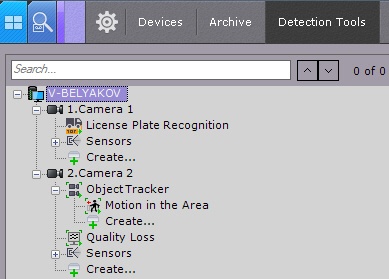
| Note | |||
|---|---|---|---|
| |||
Aby kamera wideo oraz gałąź zawierająca jej wejścia oraz narzędzia detekcji do niej przypisane poprawnie wyświetlały się na liście w zakładce Narzędzi detekcji, kamera ta musi być aktywna w Axxon Next.For a video camera and its corresponding branch to appear in the Detection Tools list, the camera must be enabled in Axxon Next |
| Info | ||
|---|---|---|
| ||
By default, camera inputs that can be activated through an automatic rule are displayed on the list of detection tools. | ||
| ||
Domyślnie wejścia kamery które mogą zostać aktywowane poprzez automatyczne reguły są wyświetlone na liście narzędzie detekcji. |
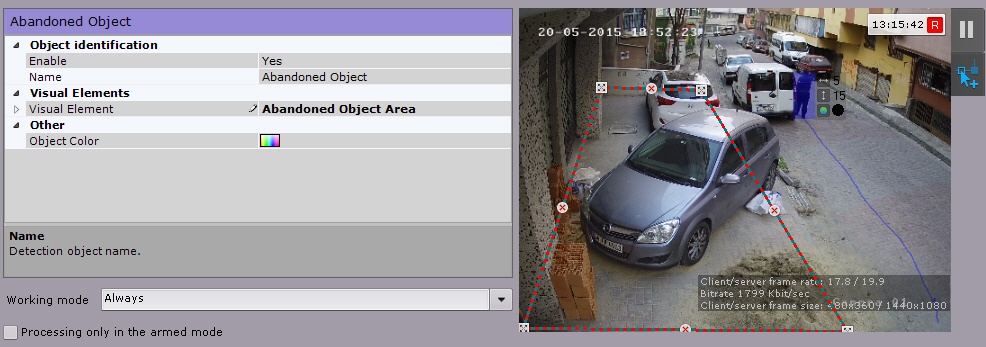
Po prawej stronie okna konfiguracji detekcji można ustawiać parametry wizualneIn the viewing tile, on the right side of the detection configuration window, you can set visual parameters.
| Info | ||
|---|---|---|
| ||
The indicator in the upper right corner displays the current time and recording status (see Time Display). | ||
| ||
Wskaźnik w prawym górnym rogu wyświetla obecny czas, oraz status nagrywania (zobacz: Wyświetlacz Czasu). |
Domyślnie detekcja zdarzenia nie jest wyzwalaczem dla żadnych akcji. Aby utworzyć reakcję systemową na zdarzenie, utwórz automatyczną zasadę bądź makro (zobacz: Konfiguracja Makr, Zestawy ReakcjiThe default system setting to a detection event is not to trigger any response actions. To set system response, create an automatic rule or a macro (see Configuring Macros, Automatic Rules).
Overview
Content Tools