
Go to documentation repository


Page History
Panele Zdarzeń wyświetlają informacje na temat zdarzeń systemowych. Dane na temat konfigurowania zdarzeń do wyświetlania są dostępne w odpowiedniej sekcji.
Zdarzenia na panelu mogą być wyświetlane na trzy sposoby, zależnie od przycisku zaznaczonego w lewym górnym rogu panelu:
Pierwsza klatka zdarzenia oraz czas;
Events Boards display information about selected system events. Configuration of the events to display is performed in the corresponding section.
Events on the board can be displayed in three ways, chosen via the buttons in the upper-left corner of the board:
First frame of events and their time
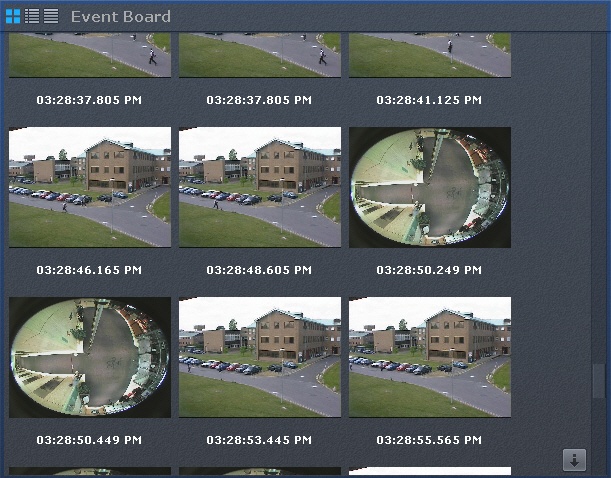
Info title Note The frame is not displayed when there is no recording in the archive.
- First frame of events and text

- Text only

When a layout is switched to, by default the Events Board is displayed as configured in the settings.
At the top of the list are the most recent events. If you are at the end of the list, you can use the  button in the panel's top-right corner to go to the most recent events. New events are highlighted for 4 seconds. The panel may include up to 100 events. If the number of events exceeds the maximum permitted value, the newer events will be displayed in place of older ones.
Informacja Jeśli w archiwum nie istnieją nagrania wideo z danej kamery, klatka wideo ze zdarzenia nie jest wyświetlana.
- Pierwsza klatka zdarzenia oraz opis;
- Opis zdarzenia.
Domyślnie Panel Zdarzeń wyświetla zdarzenia na sposób wybrany w trybie edycji układów.
W górnej części listy wyświetlane są najnowsze zdarzenia. Jeśli użytkownik przejdzie do końca listy, istnieje możliwość użycia klawisza w prawym górnym rogu panelu w celu przejścia do najnowszych zdarzeń. Nowe zdarzenia są podświetlane przez 4 sekundy. Panel może wyświetlać do 100 zdarzeń. Jeśli liczba zdarzeń przekracza maksymalną dozwoloną liczbę, nowsze zdarzenia będą wyświetlane zamiast najstarszych.
Istnieje możliwość uzyskania dostępu do panelu zdarzeń po prawej stronie ekranu (zobacz: You can also access the events panel on the right side of the screen (see Podgląd zdarzeń narzędzi detekcji dla kamery). In this case, it includes only detection events for a selected cameraW takim przypadku uwzględnione zostaną zdarzenia tylko dla wybranej kamery.
Overview
Content Tools