
Go to documentation repository


Page History
Kamery PTZ mogą być kontrolowane poprzez panel kontrolny PTZ lub bezpośrednio poprzez okno podglądu (zobacz: Kontrolowanie kamery PTZ w ekranowym trybie kontroli PTZ, Kontrolowanie kamery PTZ funkcją Areazoom, Kontrolowanie kamery PTZ funkcją Point&Click).
Użytkownik uzyskuje dostęp do panelu, gdy w trybie na żywo okno podglądu kamery wspierającej kontrolę PTZ jest zaznaczone
PTZ video camera can be controlled with the PTZ Control Panel or directly in the Viewing Tile (see Controlling a PTZ Video Camera in the OnScreen PTZ Mode, Control using Areazoom, Control using Point&Click).
The user gains access to this panel when the viewing tile of a video camera in Live Video mode that supports a PTZ control interface is selected.
| Note | ||
|---|---|---|
| ||
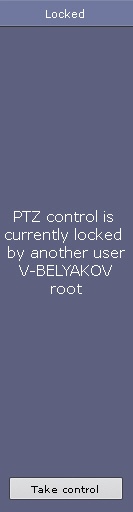
PTZ camera is controlled in accordance with the priority settings (see Kamery PTZ są kontrolowane zgodnie z ustawieniami priorytetów (zobacz: Tworzenie oraz konfiguracja ról). If multiple users have the same control priority, they can control a PTZ camera simultaneously. If the user with higher priority controls the PTZ camera with the the PTZ control panel (as long as the camera is selected) users with a lower priority can not control it. If the user with higher priority controls the PTZ camera, the relevant information is displayed on the panel.
If you disabled the option to simultaneously control a PTZ camera by multiple users, users with the same priority take over the control on a first-come, first-served basis. However, a user with equal or higher priority can take over the PTZ control. To do this, click the Take Control button. If the user that controls the PTZ camera is idle a certain time (see Konfigurowanie kontroli nad PTZ), it is automatically unlocked and the control becomes available to all users. |
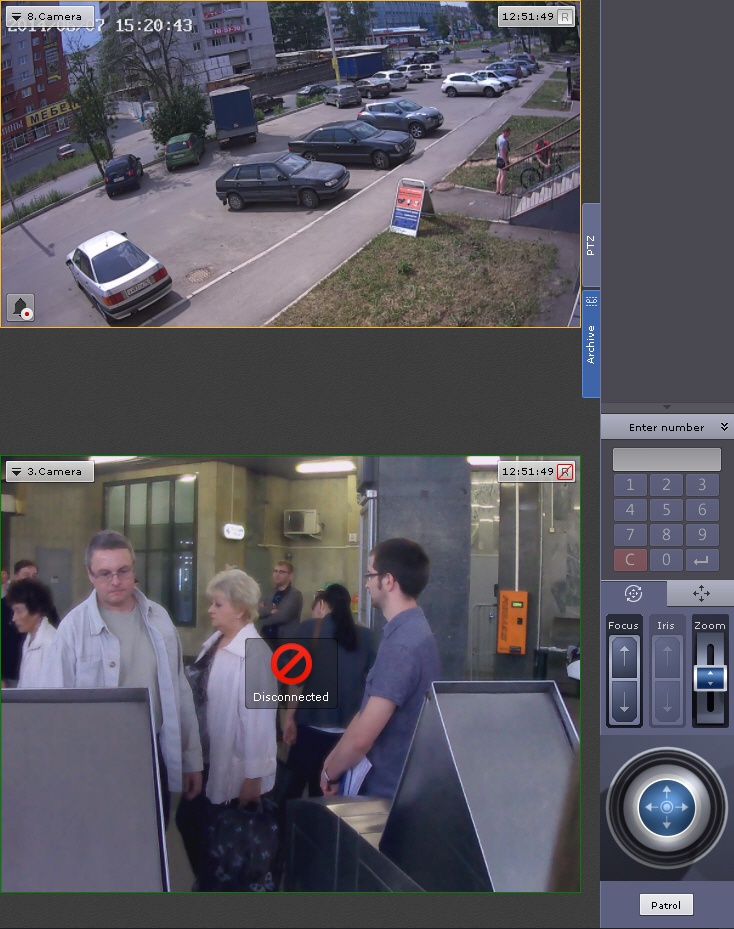
The following actions can be performed using the PTZ device control panel:
- Use presets.
- Modify the parameters of the iris, focus, and optical zoom.
- Modify the horizontal and vertical tilt angle of the video camera.
- Starting/stopping patrol mode.
Jeśli wielu użytkowników jednocześnie posiada takie same uprawnienia, mogą oni kontrolować kamerę PTZ jednocześnie. Jeśli użytkownik z wyższym priorytetem kontroluje kamerę PTZ poprzez panel kontrolny PTZ (jeśli okno podglądu jest aktywne), użytkownik z niższym priorytetem nie będzie mógł jej kontrolować. Gdy użytkownik o wyższych uprawnieniach kontroluje kamerę PTZ, wyświetlana jest odpowiednia informacja.
Jeśli opcja jednoczesnej kontroli kamery PTZ przez wielu użytkowników jest wyłączona, a użytkownicy posiadają te same uprawnienia, pierwszy użytkownik kamery ma pierwszeństwo. Użytkownik o równym lub wyższym priorytecie może wymusić oddanie kontroli nad PTZ; w tym celu można nacisnąć przycisk Take Control. Jeśli użytkownik, który kontroluje kamerę PTZ pozostaje bierny przez pewien czas (zobacz: Konfigurowanie kontroli nad PTZ), kontrola jest automatycznie odblokowywana, i staje się automatycznie dostępna dla wszystkich użytkowników. |
Następujące akcje mogą być przeprowadzane poprzez panel kontrolny PTZ:
- Korzystanie z presetów.
- Modyfikowanie parametrów przesłony, ostrości, oraz zoomu optycznego.
- Modyfikowanie zwrotu kamery w pionie i poziomie.
- Rozpoczynanie/zatrzymywanie trybu patrolu.
| Info | ||
|---|---|---|
| ||
| Ustawienia presetów są szczegółowo opisane w sekcji | ||
| Info | ||
| ||
| Setting presets is described in detail in the section The PTZ Control Panel. |
Overview
Content Tools