
Go to documentation repository


Page History
| Section | ||||||||||||||||||||||||
|---|---|---|---|---|---|---|---|---|---|---|---|---|---|---|---|---|---|---|---|---|---|---|---|---|
| borderStyle
| solid
| ||||||||||||||||||||||
| ||||||||||||||||||||||||
Function
The audio player is used to operate the audio monitoring subsystem, that provides audio monitoring and recording for secured locationsprotected facilities.
Functions
Audio player provides:
- realtime Realtime monitoring of the event audio component;
- recording Recording of the event audio component;
- playback Playback of the recorded event audio component;
- saving Saving the recorded event audio component as a standard Windows wave file.
...
The figure shows the audio player interface.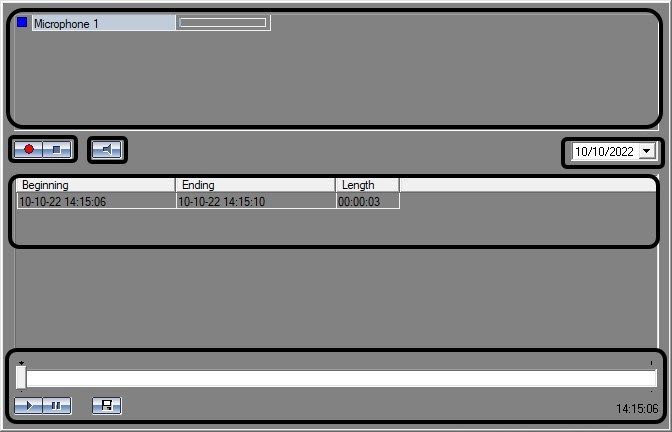
The upper part of the audio player window displays the list of attached microphones. Each microphone has a status indicator (to the left) and microphone signal level dynamic scale (to the right) (see also Microphone status indication).


In the middle part of the audio player window the  recording control buttons are displayed (also used for microphone arming and disarming) and the
  button button used for switching of real time monitoring and the list of recorordings made from a given microphone on a certain day.
Each audio recording has a from/to time and duration marks.
To choose available recordings to be viewed, enter its date in the field above the recordings list.


The tape transport panel is placed below the audio recordings list.
The  and
and  buttons are used for selected recording playback control, the
  button button is used to export the recording into the file.
Overview
Content Tools