
Go to documentation repository


Page History
The object symbol icon on the Map may can be visible or hidden. An object can be hidden in one of the following ways:
At the system configuration stage. Visible objects are always reflected displayed on the Map, whereas hidden objects are reflected displayed only in "view the hidden objects " display mode. To switch-on "view hidden objects", use The hidden objects display mode is enabled using the Show hidden command of item in the Map functional menu called with a right mouse click on function menu that you can access by right-clicking any place on the Map, which is free from object symbols.icons:
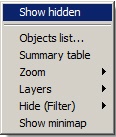
The status of the mode is indicated by a checkmark near the Show hidden objects button, which indicates that hidden objects can be viewed.checkbox next to the Show hidden item—it is set when the mode is enabled and it is clear when the mode is disabled: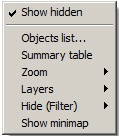
Info title Note. Hidden objects view and hide function applies across all Map levelsThe hidden objects display mode applies to all Map layers.
- With the filter on the map layer. This filter applies only to the current layer and hides all objects of the specified type or the names of objects. Hiding and displaying objects is performed using the Hide (Filter) command in the Map functional menu called with a right mouse click on Map function menu that you can access by right-clicking any place on the the Map, which is free from object symbols.icons:
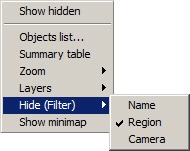
Hidden objects are checked marked with tick marka checkbox.
The hiding on the system configuration stage takes precedence over the hiding Name item is used to hide the names of all objects on the current map layer: if it is selected, then only graphic images of objects (icons, lines, etc.) are displayed on the layer without captions.
Specifics of hiding objects:
- The hiding specified at the system setup stage has priority over the hiding selected on the map layer
...
- . Therefore, if an object is hidden
...
- at the setup stage, it will not be displayed even if the checkbox in the Hide (Filter)
...
- menu item checkbox is clear.
- If the names of
...
- objects are hidden and an alarm event occurs, the name of the object with the alarm event will be displayed during the alarm. Similarly, a hidden camera is displayed during an alarm.
- The display mode of hidden objects (the Show hidden item checkbox is set) does not affect the object filters applied on the layer: if objects are hidden using the Hide (Filter) item, then even if the Show hidden item checkbox is set, they will remain hidden on this Map layer.
Overview
Content Tools