
Go to documentation repository


Page History
To use network disks as an archive, set the UNC paths to them in INTELLECT™. Details of in Axxon PSIM.
For details on working with network disks in INTELLECT™ Axxon PSIM installed as a Service are given in service, see Using network disks of INTELLECT™ Axxon PSIM installed as a Service section.
While working If you work in Windows Vista and Windows 7 OS, consider the following features:
- For Windows Vista and Windows 7 OS with UAC enabled, it is necessary to connect network disks via command prompt with Administrator’s administrator rights. The way of connecting is described in Connecting network disks in Windows Vista and Windows 7 OS section.
- Access to network disks on computers with Windows Vista or Windows 7 OS can be forbidden when the user account control User Account Control (UAC) is swiched onenabled. To enable access, create the EnableLinkedConnections key of the DWORD type with the 1value in the HKEY_LOCAL_MACHINE\SOFTWARE\Microsoft\Windows\CurrentVersion\Policies\System registry section. Details of For details on working with registry keys are in , see Working with Windows OS registry section.
| Info | ||
|---|---|---|
| ||
| When the connection with net the network disk failsis lost, video is not isn't recorded (for 30-–60 seconds) and isn't displayed. This is due to filesystem file system features. |
| Note | ||
|---|---|---|
| ||
The archive from various Servers must not be recorded It is prohibited to write archives from different servers to one network storage device, as this leads to a violation of the archive index will be violated. |
To add a network disk by specifying the UNC path, do the following:
- Go to the last line in the disk list and click the down key on the keyboard.
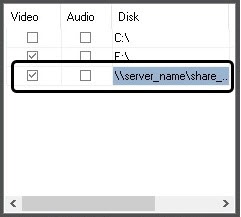
In the Disk column, specify Specify the path to a network disk in the appeared line in the Disk column. The UNC path is set in the \\server_name\share_name format, where server_name is the name of the file server and share_name is the network name of the general folder.
Info title Note. If there are any problems with storing writing the video/audio archive at to network disks, then use the net use command of the Windows command prompt:
net use disk_name: \\server_name\share_name /delete
net use disk_name: \\server_name\share_name /USER:user_nameWhere user_name is a user that has rights to store to the selected network disk and on whose behalf the video module is launched;.
disk_name: is the name of the disk drive. This is to be performed after every Windows OS restart.letter. You must perform these actions after each Windows OS reboot.
For details Details about the net use command are in , see Microsoft's official documentation (www.microsoft.com).
- Set a In the Video column, set the checkbox for the created disk in the Video column.
- Click the Apply button.
A Adding a network disk by specifying the UNC path is now addedcomplete.
| Tip |
|---|
Free disk space (video archive size) required Selecting the Select disks for video archive storage |
...
Overview
Content Tools