
Go to documentation repository


Page History
The Detection zone object is used to register and configure intelligent smart video detectors. The settings panel of the the Detection zone object is shown in the figure.:

Table The table describes the parameters of the settings corresponding to the elements of the settings panel of the Detection zone object.:
№ | Parameter | Method for setting the parameter value | Parameter description |
Representation | Default value | Value range | |
1 | The Identification number* | Automatically | Displays the identification number of the Detection zone object in the |
video surveillance system |
with distributed architecture | Digits, letters, periods, hyphen, dash, and underscore | NA |
Sequence of numbers
Depends on the number of the Detection zone objects in the |
video surveillance system |
with distributed architecture | ||
2 | The Name* | Enter the value in the field |
Sets the name of the Detection zone object in the |
video surveillance system |
with distributed architecture | Latin alphabet, Cyrillic |
, digits and service characters | Detection zone | A line containing a sequence of any |
characters (letters, digits, service characters |
except > and < |
characters), |
case- |
insensitive. Number of |
characters—from 1 to 60 |
3 | The Disable |
Is identified by the check mark
checkbox | Set the checkbox | Disables the Detection zone object in the video surveillance system with distributed architecture |
Boolean type |
Not available
Clear | Set—the |
Detection zone is disabled and |
isn't used Clear—the Detection zone object is enabled and |
used | |
4 | The Camera |
drop-down list | Select the value from the list |
Sets the Camera parent |
object of the |
video surveillance system |
with distributed architecture to which the given Detection zone object |
belongs |
Names of the Camera objects registered in the system | Name of the Camera parent |
object |
Depends on the number of the Camera objects in the |
video surveillance system |
with distributed architecture | |
5 | The Detection |
drop-down list | Select the value from the list |
Sets the type of the used detector |
Names of the detectors in the system |
Motions |
| |
6 | The Show |
Is identified by the check mark
Set the checkbox | Displays |
the frame border of an object in the |
camera field of view. This parameter is active only |
when you select the following detectors |
from the |
Detection drop-down list: motion, infrared |
Boolean type |
| Clear |
Set—the object frame border is displayed in the |
video surveillance area Clear—the object frame border |
isn't displayed in the |
video surveillance area | |
7 | The Alarm |
checkbox | Set the checkbox | Enables alarm generation on the camera and |
automatic recording of the video signal from the camera |
upon alarms of the selected detector |
Boolean type |
Not available
Clear | Set—on alarm received from the selected detector, an alarm is generated on the camera, and automatic |
recording of the video signal is performed |
Clear—alarm isn't generated on the camera, and automatic recording of the video signal |
isn't performed on the alarm received from the selected detector |
8 | The Armed always |
Is identified by the check mark.
checkbox | Set the checkbox | Sets the Armed always state for |
the selected detector |
Boolean type |
Not available
Clear | Set—the detector is always in the Always armed state Clear—the operator can |
Yes – the detector should always be armed.
No – the operator maydisarm the detector |
9 | The Sensitivity | Set the |
slider in the |
position | Sets the setting parameter of the same name for the selected detector. Depends on the type of the selected detector |
.
|
The value of this parameter corresponds to the minimum value of the averaged brightness of the moving object, at which the |
detector generates an event only at its motion |
and not at the video signal noise (including snow, rain, |
and so on). The HIGHER the sensitivity value, the more sensitive the |
detector is.
|
The value of this parameter characterizes the minimum degree of accuracy loss, expressed in the difference between the average number of outlines and the number of outlines in the incoming frame at which the |
detector must generate an event.
|
The value of this parameter characterizes the minimum degree of |
accuracy loss, expressed in the difference between the average number of outlines and the number of outlines in the incoming frame at which the |
detector must generate an event.
|
This parameter characterizes the deviation of the integral brightness of the frame from the average value at which the |
detector must generate an event.
|
This parameter corresponds to the rate of illumination of the video expressed in the difference between the positions of medians of the brightness chart of the incoming frame and the reference illumination frame at which the |
detector must generate an event.
|
This parameter corresponds to the rate of narrowing of the brightness chart of the frame, |
that is, the estimation of the frame filling with gray color, at which the |
detector must generate an event.
|
The value of this parameter corresponds to the minimum value of the averaged brightness of the moving object, at which the |
detector generates an event at its motion |
NA | Average |
NA | ||
10 | The Contrast | Set the |
slider in the |
position |
Sets the minimum contrast of the object at which the |
detector generates an event at its motion. The HIGHER the specified contrast value, the more different the neighboring b/w |
elements must be |
so that the |
detector considers them as different objects. |
Note. It isn't used for all detector types |
NA | Average |
NA | ||
11 | The Filter | Set the |
slider in the |
position | Sets the setting parameter of the same name for the selected detector. Depends on the type of the selected detector.
|
The value of this parameter corresponds to the threshold of color processing of objects, at which the |
detector must generate an event. The HIGHER the filtering, the more different the neighboring |
elements (pixels) of the image must be so that the |
detector considers them as different objects.
|
The value of this parameter corresponds to the contrast threshold of the detected object. |
Note. It isn't used for other detector types |
NA |
Minimum |
NA | ||
12 | The Size | Set the |
slider in the |
position | Sets the setting parameter of the same name for the selected detector. The value of this parameter corresponds to the minimum size of the |
detected object |
relative to the frame |
size. |
Note. It isn't used for all detector types |
NA | Average |
NA | |
13 | The Direction |
buttons | Press the arrow |
button |
Sets the direction of search for the motion detector |
8 possible directions |
of object movement in the frame |
All directions are |
included: up, down, to the left, to the right, up and to the left, up and to the right, down and to the left, down and to the right |
Up, down, to the left, to the right, up and to the left, up and to the right, down and to the left, down and to the right |
14 | The Delay between MD_INFO (ms) | Enter the value in the field | Sets the |
time period in milliseconds between the MD_INFO events |
of the CAM_ZONE |
detector in the Event |
viewer (if the MD_INFO event is |
included in ddi) |
Non-negative integer
Integer number | NA | >=0 |
*Name of the element isn't displayed in the settings panel of the given object
Detection stability
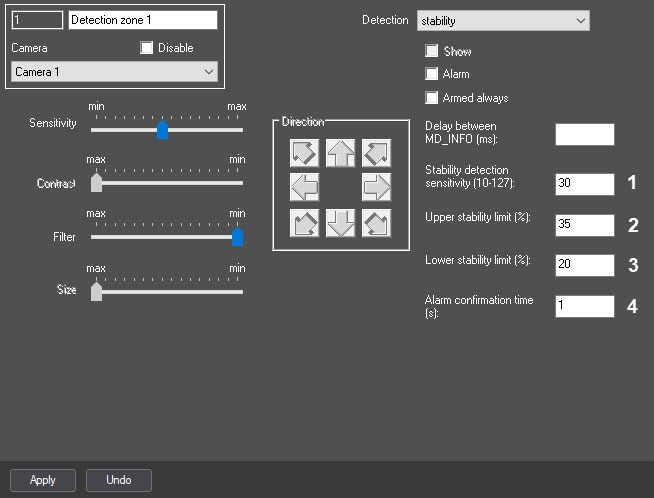
№ | Parameter | Method for setting the parameter value | Parameter description | Representation | Default value | Value range |
| 1 | The |
| Stability detection sensitivity (10-127) field | Enter the value in the field |
Video signal stability detection tool
Sets the threshold of |
difference between the brightness of the pixel in the current frame |
and the background |
| Integer number | 30 | From 10 |
| to 127 |
| 2 | The Upper stability limit (%) field | Enter the value in the field |
Sets the maximum permissible percentage of the stabilized frame pixels that differ from the background by more than the value in |
the Stability detection sensitivity |
field, exceeding which the system starts monitoring the alarm status | Integer number |
| 35 | From 0 |
| to 100% |
| 3 | The Lower stability limit (%) field | Enter the value in the field |
Video signal stability detection tool
SetsSets the maximum permissible percentage of the stabilized frame pixels that differ from the background by more than the value in the Stability detection sensitivity |
field before reaching which the frame is considered stable | Integer number |
| 20 | From 0 |
| to 100% |
| 4 | The Alarm confirmation time ( |
| s) field | Enter the value in the field |
Sets the time period in seconds during which the Upper stability limit must be exceeded to generate an alarm |
| Integer number | 1 | >0 |
...
Overview
Content Tools