
Go to documentation repository


Page History
The Voice message serviceMessage Service is designed used for registration of the program module, which which supports transmission of voice messages through over the telephone lines. This service provides automatic redial of pre-defined the specified telephone numbers and playback of the audio files.
The settings panel of the Voice message serviceMessage Service object is shown in the figure.
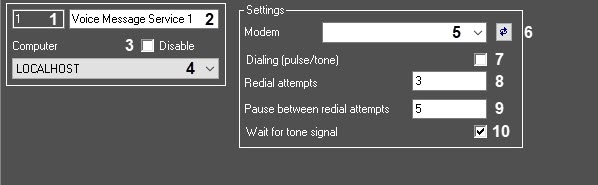
Table The table describes the setting parameters of the settings corresponding to the elements of the settings panel of the Voice message serviceMessage Service object.
№ | Parameter | Method for setting the parameter value | Parameter description |
Representation | Default value | Value range | |
1 | The Identification number* | Automatically | Displays the identification number of the Voice |
Message Service object in the |
video surveillance system |
Sequence of numbers
-
From 1 and above.
with distributed architecture | Digits, letters, periods, hyphen, dash, and underscore | NA |
Depends on the number of the Voice |
Message Service objects in the |
video surveillance system with distributed architecture | ||
2 | The Name* | Enter the value in the field |
Sets the name of the Voice |
Message Service object in the |
video surveillance system |
with distributed architecture | Latin alphabet, Cyrillic, digits, and service characters | Voice |
Message Service | A line containing a sequence of any |
characters (letters, digits, service characters |
except > and < |
characters), |
case- |
insensitive Number of |
characters—from 1 to 60 |
3 | The Disable |
Is identified by the check mark
checkbox | Set the checkbox | Disables the Voice Message Service |
object in the |
video surveillance system |
with distributed architecture | Boolean type |
Not available
Yes – the Voice message service is disabled and is not in use
No – the Voice message service is enabled and is in use.
4
Computer
Is selected from the list
Assigns the parent Computer object of the digital distributed system, to which the given Voice message service object refers.
Clear | Set—the Voice Message Service object is disabled and isn't used Clear—the Voice Message Service object is enabled and used | |||
4 | The Computer | Select the value from the list | Sets the Computer parent object of the system with the distributed architecture, to which the given Voice Message Service object belongs | Names |
of the Computer objects registered in the system |
Name of the Computer parent |
object | Depends on the number of the Computer objects in the |
video surveillance system with distributed architecture | ||||||
The Settings | ||||||
group | ||||||
5 | The Modem | |||||
drop-down list | Select the value |
from the list |
Sets the voice modem used for transmitting the voice messages |
Names of the voice modem registered |
in Windows OS |
| NA | Depends on the number of the connected voice modems |
6 |
The |

Click the button |
Scans connected |
devices to identify the voice modems and |
-
-
put them in the Modem list | NA | NA | NA |
7 | The Dialing (pulse/tone) checkbox |
Is identified by the check mark
Set the checkbox | Sets the |
number dialling mode: pulse or tone |
Boolean type |
Not available
Clear | Set—tone Clear—pulse |
Yes – tone dialling.
No – pulse dialling.8 | The Redial attempts field | Enter the value in the field |
Sets the maximum number of redial attempts to establish a connection |
Sequence of numbers |
3 | From 1 to 10. |
Recommendedfrom 1 to 5 |
9 | The Pause between redial attempts field | Enter the value in the field |
Sets the length of a pause between redial attempts |
from
Sequence of numbers | 5 | From 3 to 600. |
Recommended |
from 30 to 120 |
10 | The Wait for tone signal checkbox |
Is identified by the check mark
Set the checkbox | Enables the tone signal wait function in the phone line before dialling the number |
Boolean type |
Set |
Set—waiting for a |
tone signal in the phone line before dialling the number |
Clear—waiting for a |
tone signal in the phone line before |
dialling the number isn't required |
*Name *The name of the element is not isn't displayed in the settings panel of the given object.
Overview
Content Tools