
Go to documentation repository


Page History
...
| Section | ||||||||||||||||||||||||
|---|---|---|---|---|---|---|---|---|---|---|---|---|---|---|---|---|---|---|---|---|---|---|---|---|
|
Configuring Samsung SPC-7000 control panel
Configure Samsung SPC-7000telemetry control panel in Intellect Axxon PSIM as follows:
Create the Telemetry control panel object.
Info title Note. You can leave default settings of the Telemetry control panel object. - Create the Control panel object.
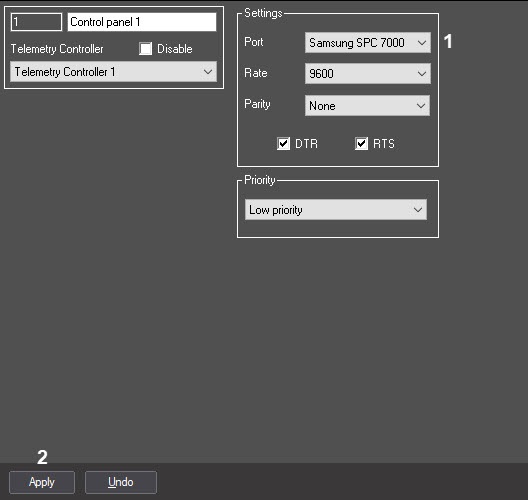
SelectSamsung SPC-7000 in the Port field (1).
Info title Note. As the control panel is connected to the computer via USB, then you can leave default Speed, Parity, DTR and RTS settings. - To apply the changes, click the Apply button (2).
...
Overview
Content Tools