
Go to documentation repository


Page History
Intellect Axxon PSIM can act as receiver and transmitter of RabbitMQ events. Download and install the following components from the https://www.rabbitmq.com/install-windows.html website before using this functionality:
- Rabbit service.
- Erlang.
By default, RabbitMQ has a built-in guest/guest account that only works with localhost. Create a new account to use RabbitMQ remotely.
The examples below mention the amqp_sendstring.exe and amqp_listen.exe utilities. These utilities for processing and sending messages from the Intellect Axxon PSIM are to be implemented by programmer.
...
- Go to the RabbitMQ tab on the Security zone object settings panel on the Programming tab of the System settings dialog box (1).
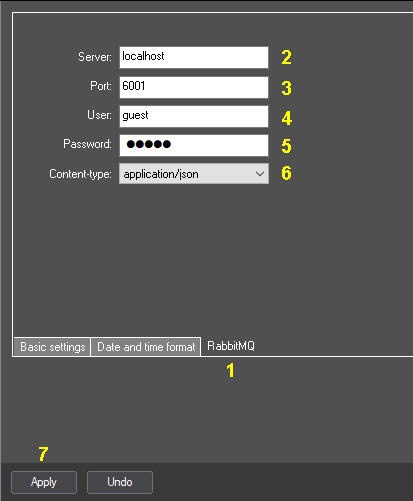
- In the Host field, enter the name or address of the RabbitMQ host (2).
- In the Port field, enter the port to connect with the RabbitMQ host (3). If the port is 0 or not set (by default), the RabbitMQ client does not run.
- In the User field, enter the RabbitMQ user name (4).
- In the Password field, enter the RabbitMQ user password (5).
- From the Content-type drop-down list, select the data type to be sent and received by Intellect Axxon PSIM (6):
application/json – a message is sent and received in JSON format. If Intellect Axxon PSIM cannot parse the message in JSON format, an attempt is made to recognize the message in plain/text format.
plain/text – the Intellect Axxon PSIM event is sent and received in the format "TYPE|ID|EVENT".
- Click Apply (7).
...
Axxon PSIM provider and third party receiver
Intellect Axxon PSIM provider operates in amq.topic mode, and the receiver operates in amq.direct mode.
amq.topic allows for subscriptions ranging. Each event sent from Intellect Axxon PSIM is signed with a special header, which is built according to the following scheme:
routingkey = "intellectpsim.event." + msg.GetSourceType() +"." + msg.GetSourceId() + "." + msg.GetAction();
...
amqp_listen.exe localhost 5672 amq.topic intellectpsim.event.#
Subscription to Action==”RUN” events
amqp_listen.exe localhost 5672 amq.topic intellectpsim.event.*.*.RUN
| Note | ||
|---|---|---|
| ||
Events enter the RabbitMQ queue from each Intellect Axxon PSIM core individually. For example, if there are two cores in the system, and the event occurred on a core that has incorrect settings or does not have a connection to RabbitMQ, the event will not get into the queue, despite the fact that the second core will receive it. Each core sends only its own messages. |
...
Axxon PSIM core receiver
The receiver is implemented according to the amq.direct scheme. It is subscribed to all events with the "bindingkey" key. bindingkey should have the following format: "intellectpsim." + ComputerName (case sensitive).
...
Example events that will be receiver by Intellect Axxon PSIM core:
text:
amqp_sendstring.exe localhost 5672 amq.direct intellectpsim.ASUS "CAM|1|HELLO"
or JSON
amqp_sendstring.exe localhost 5672 amq.direct intellectpsim.ASUS {\"Type\":\"MACRO\",\"Id\":\"1\",\"Action\":\"RUN\",\"Params\":{\"test1\":\"+++\",\"test2\":\"000\"}}
Overview
Content Tools