
Go to documentation repository


Page History
The DNS section is used for setting the automatic connection between the Client and reserve video Servers in case of connection loss with the main Server. In the DNS section, it is necessary to specify netnames network names and IP - addresses of reserve video Servers as they are not listed in the Windows registry by default.
The settings panel for of the DNS section is shown in the figure.
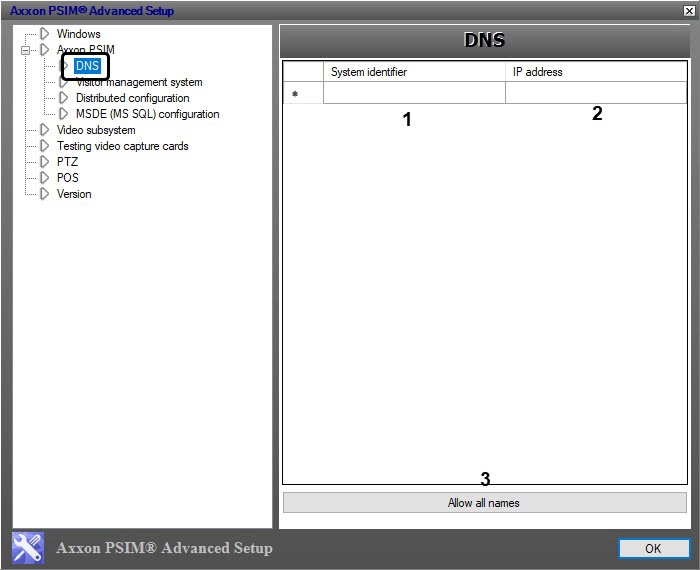
The parameters of the DNS settings panel of the DNS section are described in the table.
№ | Parameter name | Field type | Method for setting the parameter value | Parameter descriptionDescription | Representation | Default value | Value range |
1 | The System identifier column | Type-in Enter the value in the field | Set Sets the netname network name of the reserve video Server if the connection with main Server is lost | - | - | Depends Depends on net the network settings of the reserve video serverServer | |
2 | The IP - address column | Type-in Enter the value in the field.
| Set Sets the IP - address of the selected reserve video Server | IP - address | - | Depends on net the network settings of the reserve video Server | |
3 | The Allow all names button | Click the button | Computer’s Automatically adds the computers IP - addresses, set in the System identifier column, are automatically added to the IP - address column , if these these IP addresses are enabled and identified | - | - | - |
| Info | ||
|---|---|---|
| ||
To delete a specified server, select it in the list (click the row) and press Ctrl+Del on the keyboard. |
Overview
Content Tools