
Go to documentation repository


Page History
Launching ArpEdit can be done in one of the following ways:
- Launch from the Intellect Axxon PSIM installation directory. To launch the ArpEdit utility from the Intellect Axxon PSIM installation directory, follow these steps:
- Go to the folder where you installed Intellect Axxon PSIM (default directory is C:\Program files\IntellectAxxon PSIM).
- Go to the Tools\Arpedit folder.
- Launch the file arpedit.exe.
- Launch from the Start menu. To launch the ArpEdit utility from the Start menu, select the menu item Create dialog boxwindows, located in Start -> Programs -> Intellect -> Utilities → Axxon PSIM.

Closing the operation of the ArpEdit utility may be done in one of the following ways:
- In the system menu of the ArpEdit utility, in the File heading, select Exit.
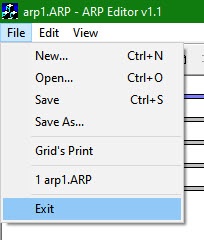
- Click

 .
.
If the document contains any unsaved changes, a Report editor dialog box appears.
...
Overview
Content Tools