...
- Go to the Speed traps server object (2).
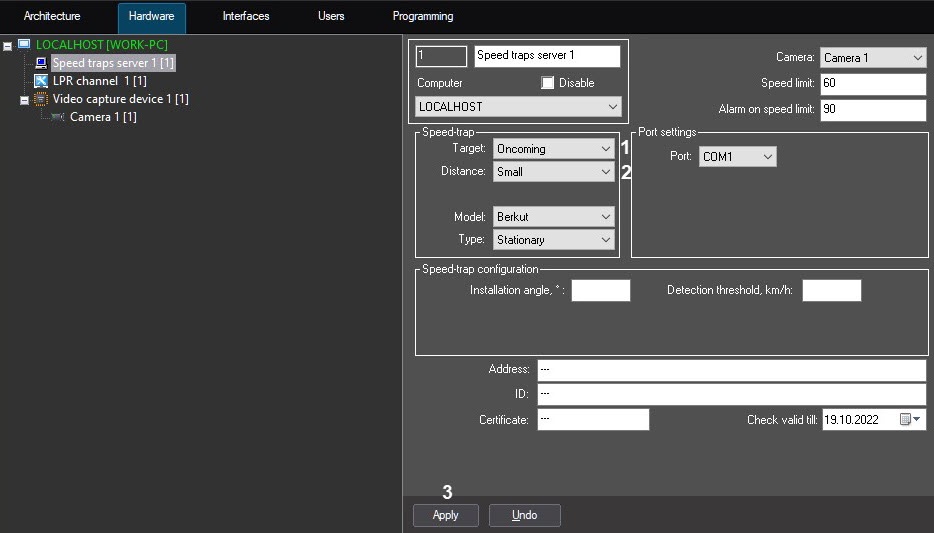 Image Modified
 - From the Target drop-down list (31), select the vehicle direction relative to the Speed-trap device to determine its speed of movement.:
- Automatically - − to automatically determine the vehicles speed moving relative to the Speed-trap device;
- Oncoming - − to determine the vehicles speed moving oncoming to the installed installed Speed-trap device;
- Passing - − to determine the determine the vehicles speed moving from the installed Speed-trap device.
When configuring the Auto-URAGAN or CARMEN or AR-Auto software modules, from the Distance drop-down list (2), select the distance from the the Speed-trap device to the place where the vehicle speed is determined.
| Info |
|---|
|
- The physical distance from the Speed-trap device to the place where the speed is determined is indicated in the documentation for the Speed-trap device.
- The value of the Distance parameter is determined experimentally.
|
- Click Apply (43).
The vehicle movement direction and distance is now selected.


