
Go to documentation repository


Page History
The AAN controller is configured on the settings panel of the Apollo AAN object created on the basis of the Driver of senior line object.
The AAN controller is configured as follows:
- From the Type of controller drop drop-down list, select the type of AAN controller (AAN-32 or AAN-100) depending on the type of hardware being used (1).
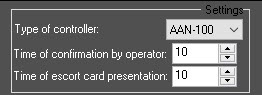
- In the Time of confirmation by operator field field, enter the time period in seconds for operator to make a decision to grant or deny access (2).
- In the Time of escort card presentation field field, enter the time period in seconds between the presentation of the first and second access cards which, if exceeded, will result in access not being granted (3).
- From the PIN code drop-down list, select the length of PIN - code being used. Select the Do not use value if it's not required to use PIN - code (4).

Set the corresponding checkboxes if it's required to use additional 6 (5) or 32 (6) access or 32 access levels.
Note title Attention! The maximum number of users that can be stored in controller memory decreases if the additional access levels are used.
- Set the Use access with escort checkbox (7) if checkbox if it is necessary to confirm the access to the zone with the escort card.
In the Maximum cards number of cards field field, enter the maximum number of access cards that will be stored in the controller's memory (8).
Info title Note. The The maximum number of access cards that can be stored in the controller's memory depends on the number of memory cards installed on it.
- Configure the antipassbackthe antipassback control:
If it is necessary to activate the zone zonal antipassback control, set the Use checkbox (9) in checkbox in the Zonal APB group (for details, see Configuring antipassback).

If necessary, from the Reset TZ drop-down list (10), select the time zone over by which the double-pass antipassback control flags will be reset for all users.
If it is necessary to activate the temporary timed antipassback control, set the Use checkbox (11) in checkbox in the Timed APB group (for details, see Configuring antipassback).

From the Store on drop-down list (12), select the location for storing the double-access antipassback control flags: Reader or APB zone.
Info title Note - It is possible to activate
- either
- zonal or
- timed antipassback control. Simultaneous operation of these antipassback control modes is not allowed.
To enable the timed APB by zones, set the Use checkbox in the Timed APB group (step 8c) and select theAPB zone as the location for storing the flags (step 8d). The Use checkbox in the Zonal APB group must be clear.
- Click the Request time button (13) to request the AAN controller button to request the AAN controller time.

- Click the Synchronize time button (14) to synchronize the AAN controller button to synchronize the AAN controller time with the computer time.
- Click the Apply button (15).
...
-
 button.
Overview
Content Tools