
Go to documentation repository


Page History
The KeyWatcher keys synchronization is performed in the following way: At first, all of the keys, which are kept in the KeyWatcher ACS hardware database, are read. Then, the test is run for the presence of a key in the ACFA IntellectPSIM tree. If the corresponding key cannot be found in this tree, the key will be added to it. Odd keys are deleted from the hardware tree. Adding or deleting the keys in the hardware tree comes with the corresponding events from KeyWatcher ACS.
To synchronize KeyWatcher ACS keys with ACFA IntellectPSIM do the following:
- Go to the KeyWatcher ACS object setup panel.

- Click Synchronize keys.
The objects, which correspond to the read keys from the device database, will be added to the ACFA IntellectPSIM device tree.
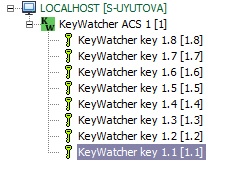
The Keys synchronization has been finished.
Overview
Content Tools