
Go to documentation repository


Page History
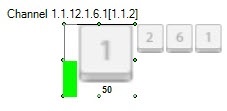
Device channels connected via the SNMP protocol can be added to the map in three views forms (perhaps possibly simultaneously):
- As sign of as a state icon (1).As sign of ;
- as a state icon state and indicator (3).;
- In in the text view form (value of element, 2).
| Info | ||
|---|---|---|
| ||
| View You can select the type of object displayingdisplay on the map is selected while the objectwhen adding it (see Intellect software package |

The element indicator takes of a channel takes a value and color in accordance with according to the rule (see the Configuring rules section). If the a new value doesn’t get into some rule, it will disappearof a channel doesn’t fall under any rule for the indicator, it disappears.
If the element value gets into several states (see the Configure the rule of changing the element state section) then its state sign will change running all states and while clicking it smaller signs of all element states are displayed. a value of a channel falls under more than one of its states, its state icon changes, running all states, and when you click it, it displays smaller icons of all the element's states.
| Info | ||
|---|---|---|
| ||
Channel state icon shows The icon of channel state displays the corresponding number of a condition number in the rule. | ||
| Info | ||
| ||
You can create and apply your own state iconsCustom state icons can be created and used. To get the instructions, contact the AxxonSoft support. |
Description of the function menu command of a channel:

- Execute—perform an action that is configured in a rule (see Setting conditions for performing actions for a channel).
The following channel states of a device connected via the SNMP protocol are possible:
| Normal |
| State 1 |
| State 2 |
| State 3 |
| State 4 |
| State 5 |
| State 6 |
| State 7 |
| State 8 |
| State 9 |
| State 10 |
| Unused |


Overview
Content Tools