
Go to documentation repository


Page History
...
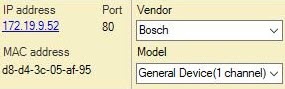
Devices connected via General Device drivers are findable via the IP device discovery wizard. The method for adding them to the system is the same as for ordinary devices (see Searching, adding, configuring, and removing IP devices).
| Info | ||
|---|---|---|
| ||
Axis devices are affected by a special restriction: if the user name username and password for device access do not equal the default values, the number of channels for the device is not discoverable. Therefore, all non-integrated devices whose user name which username and password for device access do not equal the default values will be shown in search results as 1-channel General Devices. |
You should must always select a generic driver manually.
...
- In the form for manually adding an IP device, select the device manufacturer from the list (1).
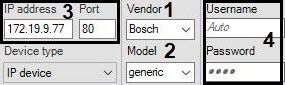
- In the Model field, select General Device or generic (2). For Axis and Bosch General devices, select the number of channels on the device.
- Enter the IP address and port for the device connection (3).
- Enter the user name username and password for connecting to the device device (4).
- Click the
 button.
Addition of the device is now complete.
...
Overview
Content Tools