
Go to documentation repository


Page History
| Section | |||||||||||||||||||||
|---|---|---|---|---|---|---|---|---|---|---|---|---|---|---|---|---|---|---|---|---|---|
|
General information
Macro is a tool intended for configuring used to configure system responses to certain events. System response may involve can include one or several different actionsactions. For example, when a fire is detected—to activate voice notification, when a camera is disarmed—to send an email notification and initiate an alarm, and so on.
| Note | ||
|---|---|---|
| ||
You can apply macros within a single Axxon domain only. Macro conditions and actions cannot include objects from another Axxon domain. |
You can create and edit macros in the Programming tab.
Macros can be of 3 types:
Macros work only within the same Axxon-domain. You cannot use objects belonging to another Axxon-domain in start conditions (see Configuring start conditions) and in macro actions (see The Domain object). |
Types of macros
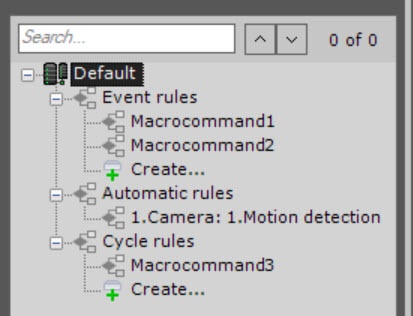
There are three types of macros:
| Types of macros | Description |
|---|---|
| Event rules |
|
...
|
...
| Automatic |
...
| rules |
|
| Cycle rules |
|
...
|
...
|
...
|
...
|
...
|
...
|
...
|
...
|
...
|
...
|
...
|
...
|
...
| Note | ||
|---|---|---|
| ||
If an event occurs while the cyclic macro is busy, it is skipped. If an event occurs while the event-driven macro is busy, it is processed as configured. |
...
|
Overview
Content Tools