
Go to documentation repository


Page History
| Tip |
|---|
Starting and stopping the Axxon One self-diagnostics service in Linux OS |
| Info | ||
|---|---|---|
| ||
The Axxon One self-diagnostics service is running by default. |
Starting the service
To launch the self-diagnostics service, complete one of the two following two actions:
- Select the Start self-diagnostics command in the Axxon One
- the Tray Tool
- Tool utility.
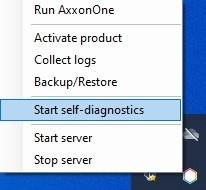
- Launch the NGP_Self_Diagnostics.
...
| title | Note |
|---|
...
As a result, the self-
...
diagnosis service will be launched.
Stopping the service
To stop the self-diagnostics service, complete one of the two following actions:
- Select the Stop self-diagnostics command in the Axxon One
- Tray Tool utility.

- Stop the NGP_Self_Diagnostics.
| Info | ||
|---|---|---|
| ||
In a failover system, the self-diagnostics service is activated/deactivated in cluster settings (see Configure a Failover System Cluster). |
As a result, the self-diagnosis service will be stopped.
Overview
Content Tools