
Go to documentation repository


Page History
The Axxon One Tray Tool launches automatically during system startup and displays an icon in the Microsoft Windows taskbar Tray Tool utility is used for quick control of Axxon One from the notification area. The utility starts automatically at system startup and is placed in the notification area.
| Info | ||
|---|---|---|
| ||
The executable TrayTool.exe executable file is located at in the <Axxon One installation folder>\Axxon OneAxxonSoft\AxxonOne\bin\ folder. |
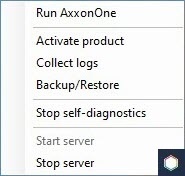
With the Axxon One Tray Tool utility, you can quickly start the following applications from the notification area:
...
:
- Run Axxon One (see Starting the client),
- Activate product (see Activation utility),
- Collect logs (see Gathering system information utility),
- Backup/Restore (see Backup and restore utility),
- Start/Stop self-diagnostics (see Self-diagnostics service),
- Start server (see Starting the server),
- Stop server (see Stop the server).
The Tray Tool utility displays the state of the server:
| Icon type | State of the server |
|---|---|
| Server is on |
| Starting/stopping the server |
| Server is stopped |
| Server is inactive |


Overview
Content Tools