
Go to documentation repository


Page History
...
| Section | ||||||||||||||||||||
|---|---|---|---|---|---|---|---|---|---|---|---|---|---|---|---|---|---|---|---|---|
|
...
알람 시작

This macro can be used together with the Dialog Board (see 이 매크로는 대화 상자 보드와 함께 사용할 수 있습니다 (Configure the Dialog Board 참조).
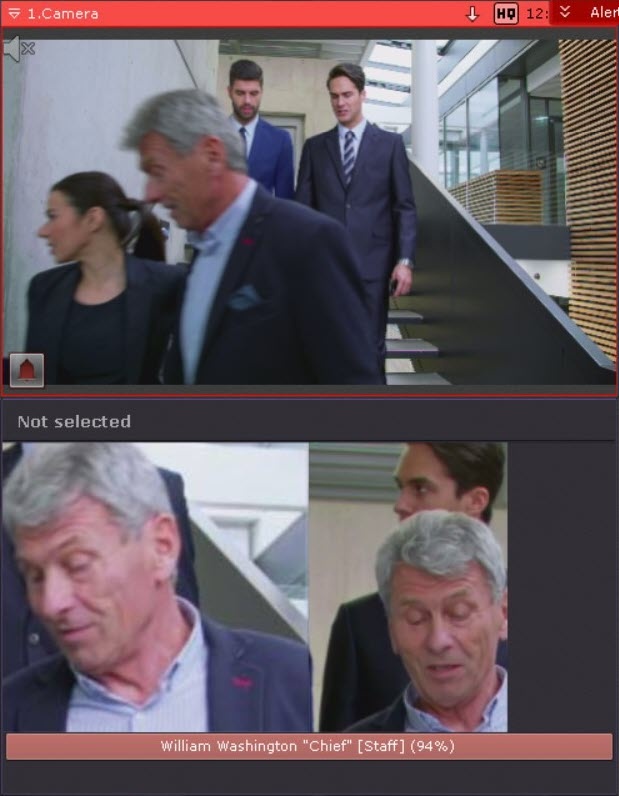
If the Dialog Board is configured to display an alarm and linked with a video camera (see Linking cells), then when a face from the list is recognized, the following information will be displayed on the Dialog Board:
- reference photo from the face list;
- an enlarged image of the recognized face in the frame;
- the name of the recognized person, the comment in quotation marks, the name of the face list in square brackets, and the percentage of similarity with the reference face in parentheses (see Faces).
Switching the output on for the authorized persons

If only an authorized list of persons has access to the room, the system will trigger an automatic reaction if the recognized face is in the authorized list.
Sending an e-mail

If the e-mail is sent via the SMTP Server (see The E-mail notifier object), then 3 files will be attached to the message:
- full frame at the moment of face recognition;
- reference photo from the face list;
- an enlarged image of the recognized face in the frame.
Starting export

As with the e-mail message, three files will be exported when exporting an image upon face recognition event:
대화 상자 보드가 알람을 표시하도록 설정되고 영상 카메라와 연결된 경우 (Linking cells 참조), 목록에 있는 얼굴이 인식되면 대화 상자 보드에 다음 정보가 표시됩니다.
얼굴 목록의 기준 사진
인식된 얼굴의 확대 이미지
- 인식된 사람의 이름, 따옴표 안의 코멘트, 대괄호 안의 얼굴 목록 이름, 그리고 괄호 안의 기준 얼굴과의 유사도 백분율 (Faces 참조).
권한자 출입 시 출력 신호 활성화
해당 공간에 권한자 목록에 있는 사람만 출입할 수 있을 경우, 인식된 얼굴이 권한자 목록에 있으면 시스템이 자동으로 반응을 실행합니다.
이메일 전송
이메일이 SMTP 서버를 통해 전송되는 경우 (이메일 알림 객체 참조), 메시지에 다음 세 개의 파일이 첨부됩니다.
얼굴 인식 시점의 전체 프레임
얼굴 목록의 기준 사진
- 인식된 얼굴의 확대 이미지
내보내기 시작
이메일 메시지와 마찬가지로, 얼굴 인식 이벤트 시 이미지 내보내기를 할 때 다음 세 개의 파일이 내보내집니다.
얼굴 인식 시점의 전체 프레임
얼굴 목록의 기준 사진
- 인식된 얼굴의 확대 이미지
- full frame at the moment of face recognition;
- reference photo from the face list;
- an enlarged image of the recognized face in the frame.
Overview
Content Tools