
Go to documentation repository


Page History
Windows 시작 메뉴에서 네트워크 설정 유틸리티를 실행할 수 있습니다: 시작 → 모든 프로그램 → Axxon One → 유틸리티 → 네트워크 설정
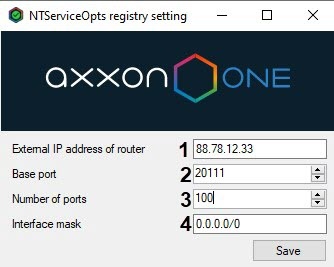
이 유틸리티를 사용하면 다음 작업을 수행할 수 있습니다.
서버가 NAT 뒤에 있는 경우 라우터의 외부 IP 주소 또는 DNS 이름을 설정합니다
You can launch the network settings utility from the Windows Start menu: Start → All Programs → Axxon One → Utilities → Network settings.
The utility allows you to:
Set the external IP address or DNS name of the router if the Server is located behind the NAT (1).
Info title Note You may set multiple interfaces using a comma separated list, such as: "IP Address1 or 주소1 또는 DNS Name1이름1, IP address2 or 주소2 또는 DNS Name2".이름2"와 같이 쉼표로 구분된 목록을 사용하여 여러 개의 인터페이스를 설정할 수 있습니다.
예For example: 88.78.12.33, ExampleAxxon.ddns.net.
Set the port range for operation of the Axxon One Server 서버의 작동을 위한 포트 범위를 설정합니다 (2-3). To do this, specify the beginning of the range and the number of ports. The number of ports should not be lower than 20. 이를 위해 범위의 시작과 포트 수를 지정합니다. 포트 수는 20보다 낮아서는 안 됩니다.
Note title Attention! Within an Axxon Domain, the port ranges of Servers should not overlapAxxon 도메인 내에서는 서버의 포트 범위가 겹치면 안 됩니다.
Info title Note The number of ports that you select affects the scalability of the system. Keep the following in mind when specifying the number of ports:
- 6 ports is a minimum system requirement for machines with Axxon One.
- In a 64-bit configuration, for any number of cameras, 6 ports are required.
- 2 ports are required to write to the archive.
- To use the Object Tracking database (track recording), 1 port is required.
- To use basic detection tools, 2 ports are required.
- To use Scene Analytics, 2 ports are required.
- To use E-mail- (through SMTP) or server audio notification 1 port is required .
선택하는 포트 수는 시스템의 확장성에 영향을 미칩니다. 포트 수를 지정할 때 다음 사항을 명심하세요.
- Axxon One이 설치된 시스템의 최소 시스템 요구 사항은 6개의 포트입니다.
- 64비트 구성에서는 카메라 수에 관계없이 6개의 포트가 필요합니다 .
- 아카이브 에 쓰려면 2개의 포트가 필요 합니다 .
- 객체 추적 데이터베이스(추적 기록)를 사용하려면 1개의 포트가 필요합니다.
- 기본 감지 도구를 사용하려면 2개의 포트가 필요합니다 .
- Scene Analytics를 사용하려면 2개의 포트가 필요합니다 .
- 이메일(SMTP를 통한)이나 서버 오디오 알림을 사용하려면 1개의 포트가 필요합니다.
- Axxon One 설정 중 서버 목록에서 다양한 네트워크의 서버 가시성을 제한합니다 (4). 가능한 값Restrict the visibility of Servers from various networks in the Servers list during the Axxon One setup (4). Possible values:
- "0.0.0.0/0" − servers from all networks will be visible− 모든 네트워크의 서버가 표시됩니다.
- "10.0.1.23/32,192.168.0.7/32" − only Servers from specified networks will be visible 지정된 네트워크의 서버만 표시됩니다.
- "127.0.0.1" − only Servers from the local network will be visible. 로컬 네트워크의 서버만 표시됩니다.
설정을 저장하면 서버가 다시 시작됩니다After you save the settings, the Server will be restarted.
Overview
Content Tools